
Customizing Triggers with an Every Period
Triggers with an Every period can have a time or usage parameter. When Every is selected as the period, the timing of the reoccurrence interval resets when the task is completed, regardless of the task's status prior to completion.
Every Period with a Time Parameter
Select Every from the Period dropdown menu.
There are two options for a time parameter: Date or Mon-Fri.
Select Date on the Parameter dropdown menu to create a customized recurrence interval. Input a numerical value for the recurrence interval in the first text box and select the appropriate units (Days, Weeks, Months, or Years).

Select Mon-Fri on the Parameter dropdown menu if the task should only reoccur on Monday – Friday.

Input a numerical value for the recurrence interval in the first text box and select the appropriate units (Days, Weeks, Months, or Years).
Clicking YYYY-MM-DD, opens a calendar modal. Select the date the task is first due on.
The task status will switch from green (or yellow if a warning is set) to red when it is past due, one day after the calendar date selected.
Input a numerical value for “warn at ____ days left” to set the number of days before the task is due for a reminder. This turns a green current / up-to-date task status to a yellow warning.
Click “Add Trigger” to save.
Every Period with a Usage Parameter
Select Every from the Period dropdown menu. Select the specific meter the task is associated with on the Parameter dropdown menu.
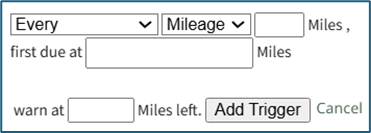
Input a numerical value for the usage recurrence interval in the first text box.
Input a value for the meter that triggers the new task being due in the “first due at” textbox.
The task status will switch from green (or yellow if a warning is set) to red after a “Log Asset Data” or “Update Meter Reading” records a usage value greater than the value entered here.
Input a numerical value for “warn at ____ left” to set meter reading that activates a reminder that the task is approaching.
This turns a green current / up-to-date task status to a yellow warning.
Click “Add Trigger” to save.
No comments to display
No comments to display