
Customize Trigger Settings with an Every (strict) Period
Triggers with a Every or Every Strict Period can have time or usage parameter.
When a trigger has a Every Strict period, the trigger is scheduled on a specific date or specific meter reading, regardless of when the previous task was actually completed. If a previous task was not completed, the incomplete task is skipped over and the next upcoming task is the only one due.
Every (Strict) Period with a Time Parameter
Select Every (Strict) from the Period dropdown menu. Select Date on the Parameter dropdown menu.

Input a numerical value for the recurrence interval in the first text box and select the appropriate units (Days, Weeks, Months, or Years).
Clicking YYYY-MM-DD, opens a calendar modal. Select the date the task is first due on.
The task status will switch from green (or yellow if a warning is set) to red when it is past due, one day after the calendar date selected.
Input a numerical value for “warn at ____ days left” to set the number of days before the task is due for a reminder. This turns a green current / up-to-date task status to a yellow warning.
Click “Add Trigger” to save.
Every (Strict) Period with a Usage Parameter
Select Every (Strict) from the Period dropdown menu. Select the specific meter the task is associated with on the Parameter dropdown menu.
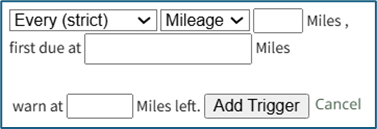
Input a numerical value for the usage recurrence interval in the first text box.
Input a value for the meter that triggers the new task being due in the “first due at” textbox.
The task status will switch from green (or yellow if a warning is set) to red after a “Log Asset Data” or “Update Meter Reading” records a usage value greater than the value entered here.
Input a numerical value for “warn at ____ left” to set meter reading that activates a reminder that the task is approaching.
This turns a green current / up-to-date task status to a yellow warning.
Click “Add Trigger” to save.
No comments to display
No comments to display