
Delete a Calendar Filter
To delete a calendar filter, go to the Home Page of the Calendar Module. All existing filters show in a horizontal row under the calendar header.

Select the edit icon above the calendar. The edit filter icon is located on the far right of the horizontal row of existing filters.
Calendar Filter Icon Explanations | |
Icons | Explanations |
| Selecting the edit filter icon will open the Edit Saved Filters Modal, where filters can be accessed for editing or deletion. |
| The pencil icon shows on the Edit Saved Filters Modal. Selecting it will allow an individual to edit the filter name. |
| The trashcan icon shows on the Edit Saved Filters Modal. Selecting it will allow an individual to delete the filter. |
| The drag and drop icon shows on the Edit Saved Filters Modal. Selecting it will allow an individual to drag and drop the filters into their preferred order that will impact the order shown on the calendar. |


The edit filter icon opens the Edit Saved Filter Modal.
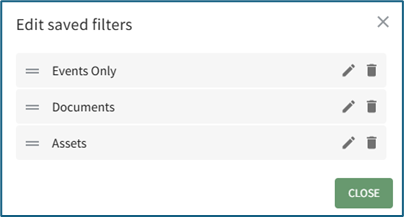
Selecting the trashcan icon opens the Delete Saved Filter Confirmation Modal.

The modal states, “Are you sure you want to delete (Filter Name)?”
Click the “Confirm” button to delete the filter and return to the calendar Home Page.
No comments to display
No comments to display