
Approve / Reject a Budget Item
To approve or reject a budget item, go to the Active Tab of the Budgets Page in the Finance Module. The pending approval column will indicate any budgets that have a budget item pending your approval.

Select the clickable link entry in the Pending Approvals column or the eyeball icon in the Actions column to open the Budget Items Per Budget Table.
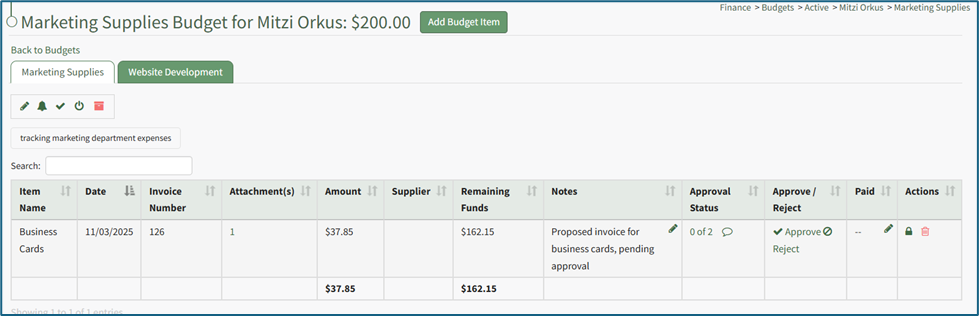
The Approve/Reject column shows a clickable link to Approve or Reject the budget item. Select the desired response.
If you elect to approve the budget item, the Approve Budget Item Modal appears. Input any comments relevant to the approval and select the “Approve Budget Item” button.
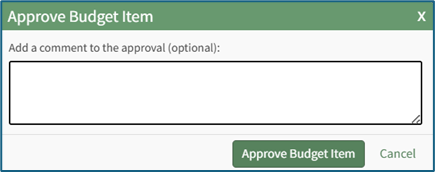
The Approve / Reject column will show the date and time the budget item was approved. The comment icon in the approval status column will show the comments input into the Approve Budget Item Modal.
If you elect to reject the budget item, the Reject Budget Item Modal appears. Input any comments relevant to the rejection and select the “Reject Budget Item” button.
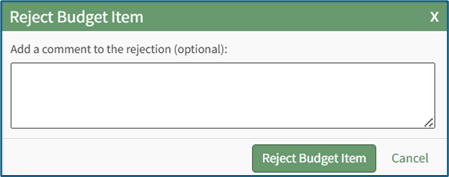
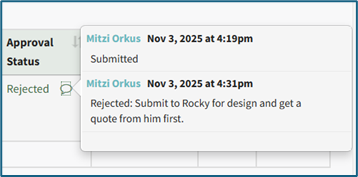
The Approve / Reject column will show the date and time the budget item was rejected.

The comment icon in the approval status column will show the comments input into the Reject Budget Item Modal.
No comments to display
No comments to display