
Resubmit a Budget Item for Approval after Edits are Made
A Budget Item must be unlocked for edits to be made.
How To: Unlock a Submitted Budget Item for Editing
In order to edit an approved budget item, any existing approvals and rejections regarding the budget item will be cancelled. The budget item must then be unlocked before editing is possible.
To unlock a submitted budget item for editing, select the appropriate budget from the Active/Closed/Archived Budget tab. Click the budget title to be taken to the Budget Item Per Budget Table.
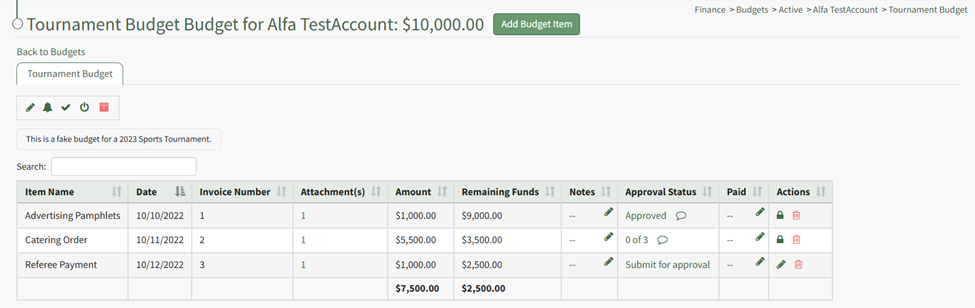
Click the lock icon in the actions column of the budget item you wish to edit.
The lock icon opens a Confirmation Modal which states, “Locked for editing. Would you like to cancel approvals and rejection and unlock editing?
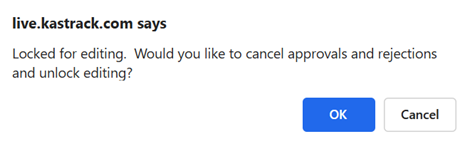
Select OK.
The lock icon is now replaced with the pencil icon in the actions column and the budget item is unlocked.

The pencil icon opens the Edit Budget Item Modal if clicked.
How To: Edit a Budget Item
Only active budgets can be edited. To edit a budget, go to the Active Tab of the Budgets Page in the Finance Module. Click the pencil icon in the Actions column of the Active Table.

This opens the Edit (BUDGET NAME) Modal.

Make any desired changes to the Budget Name, Description, Account, Amount, or Tags associated with the budget.
When done making changes, click the “Save” button and return to the Active Tab of the Budgets Page.
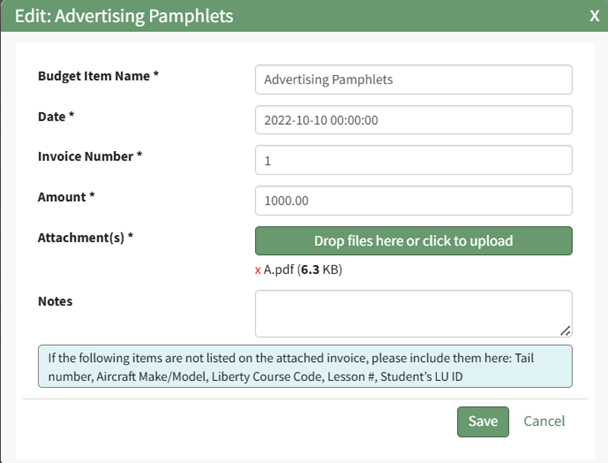
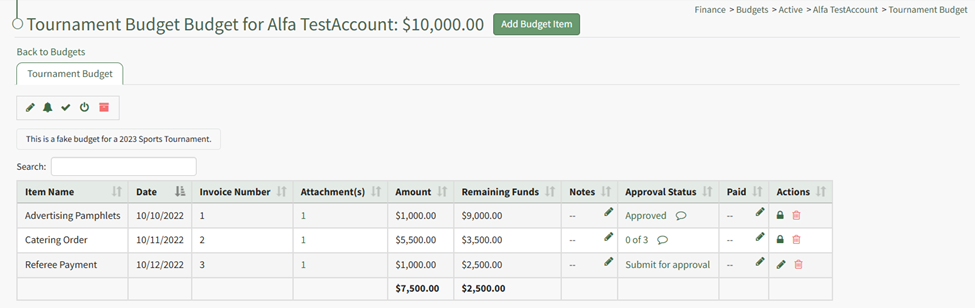
Unlocking the budget item allows the pencil icon to be selected for edits to the budget.
How To: Edit a Budget Item After Submission for Approval
Go to the Active/Closed/Archived Budget Table and click the title of the budget you wish to edit, opening the Budget Item Per Budget Table.
If the budget item has already been submitted for approval, it must be unlocked first before edits can be made.
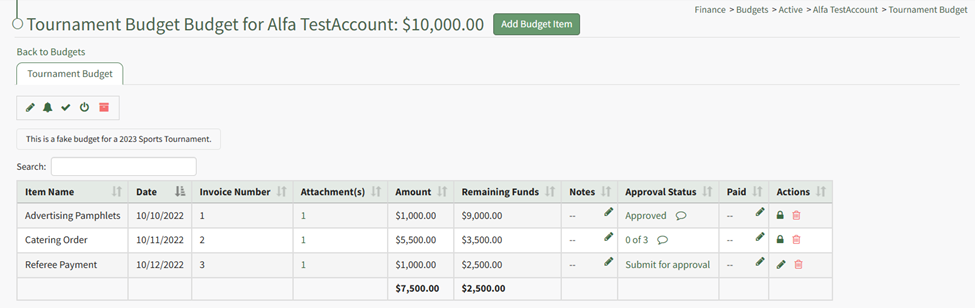
Unlock the approved budget item.
How To: Unlock a Submitted Budget Item for Editing
In order to edit an approved budget item, any existing approvals and rejections regarding the budget item will be cancelled. The budget item must then be unlocked before editing is possible.
To unlock a submitted budget item for editing, select the appropriate budget from the Active/Closed/Archived Budget tab. Click the budget title to be taken to the Budget Item Per Budget Table.
Click the lock icon in the actions column of the budget item you wish to edit.
The lock icon opens a Confirmation Modal which states, “Locked for editing. Would you like to cancel approvals and rejection and unlock editing?
Select OK.
The lock icon is now replaced with the pencil icon in the actions column and the budget item is unlocked.
The pencil icon opens the Edit Budget Item Modal if clicked.
How To: Edit a Budget Item
Only active budgets can be edited. To edit a budget, go to the Active Tab of the Budgets Page in the Finance Module. Click the pencil icon in the Actions column of the Active Table.
This opens the Edit (BUDGET NAME) Modal.
Make any desired changes to the Budget Name, Description, Account, Amount, or Tags associated with the budget.
When done making changes, click the “Save” button and return to the Active Tab of the Budgets Page.
The lock icon is now replaced with the pencil icon in the actions column, and the budget item is unlocked.

The pencil icon opens the Edit Budget Item Modal if clicked.
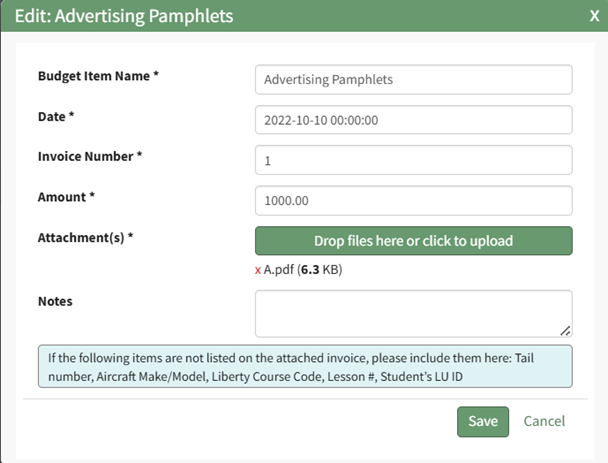
Make the necessary changes and select Save for your edits to be recorded.
You must resubmit your budget items for approval.
How To: Resubmit a Budget Item for Approval after Edits Are Made
A Budget Item must be unlocked for edits to be made.
How To: Unlock a Submitted Budget Item for Editing
In order to edit an approved budget item, any existing approvals and rejections regarding the budget item will be cancelled. The budget item must then be unlocked before editing is possible.
To unlock a submitted budget item for editing, select the appropriate budget from the Active/Closed/Archived Budget tab. Click the budget title to be taken to the Budget Item Per Budget Table.
Click the lock icon in the actions column of the budget item you wish to edit.
The lock icon opens a Confirmation Modal which states, “Locked for editing. Would you like to cancel approvals and rejection and unlock editing?
Select OK.
The lock icon is now replaced with the pencil icon in the actions column and the budget item is unlocked.
The pencil icon opens the Edit Budget Item Modal if clicked.
How To: Edit a Budget Item
{{@308}}
Unlocking the budget item allows the pencil icon to be selected for edits to the budget.
How To: Edit a Budget Item After Submission for Approval
Go to the Active/Closed/Archived Budget Table and click the title of the budget you wish to edit, opening the Budget Item Per Budget Table.
If the budget item has already been submitted for approval, it must be unlocked first before edits can be made.
Unlock the approved budget item.
How To: Unlock a Submitted Budget Item for Editing
{{@314}}
The lock icon is now replaced with the pencil icon in the actions column, and the budget item is unlocked.
The pencil icon opens the Edit Budget Item Modal if clicked.
Make the necessary changes and select Save for your edits to be recorded.
You must resubmit your budget items for approval.
How To: Resubmit a Budget Item for Approval after Edits Are Made
{{@315}}

Once edits have been made, the budget item should be resubmitted for approval. Click the “Submit for approval” link in the Approval Status column.
The Approval Status changes, now showing how many approvals have been received and the total needed. The budget item is locked again.

Once edits have been made, the budget item should be resubmitted for approval. Click the “Submit for approval” link in the Approval Status column.
The Approval Status changes, now showing how many approvals have been received and the total needed. The budget item is locked again.
No comments to display
No comments to display