
Indicate a Required Cannot be Deferred
To indicate that a required certification cannot be deferred, open the Users Page of the People Module from the Main Menu. Click the name of the user whose certification you want to indicate cannot be deferred opening the user's Certifications Details Page.
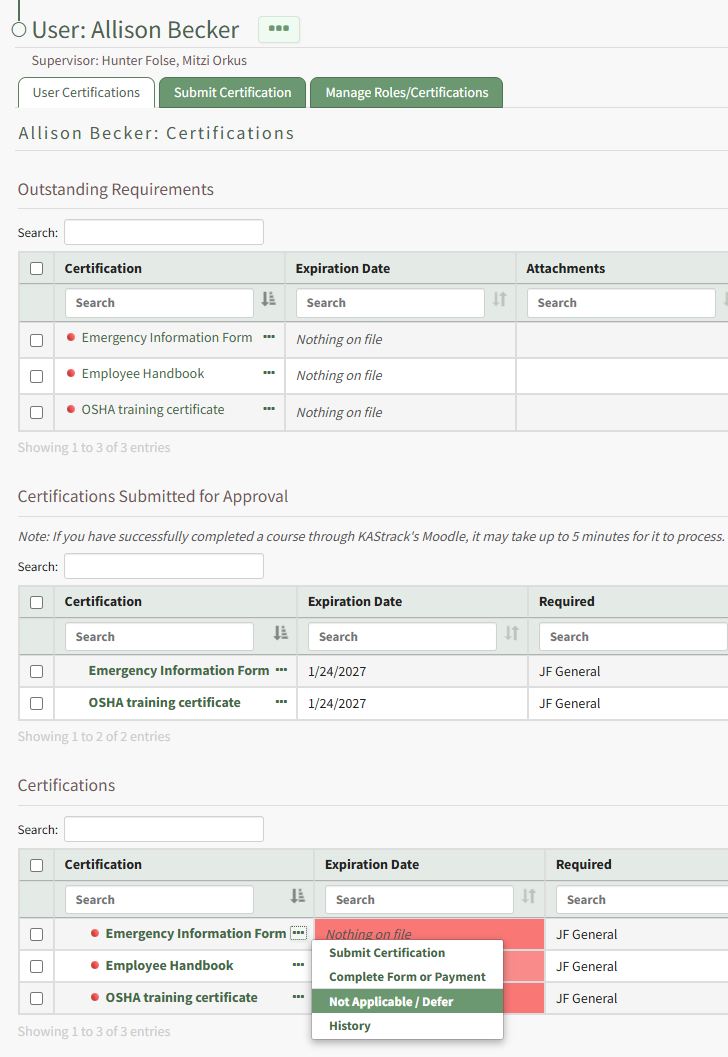
The Certifications Table will display the user's required certifications. Click the three-dot icon to the right of the user's certifications name opening the context menu and select Not Applicable / Defer. This opens the Defer Certification Modal.
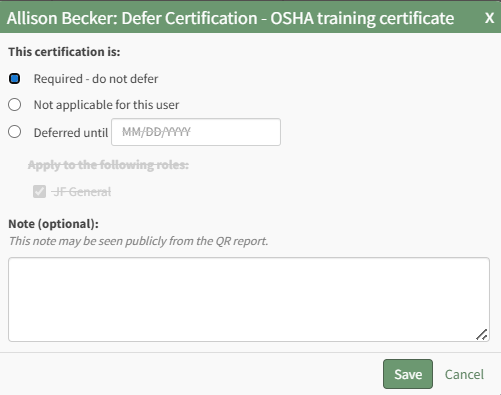
Click to indicate that the certification is required and cannot be deferred. The certification is no longer applied through a certification role. Add any relevant notes regarding the requirement.
Any notes made regarding the deferment on this modal will be publicly visible on the user's QR Report.
Select the Save button.
No comments to display
No comments to display