
Create a New Dashboard
To create a new dashboard, click the “+” icon located to the right of any existing dashboard tabs.

This opens the New Dashboard Modal.

Input the desired title for the new dashboard and select the “Create Dashboard” button. Dashboard names must be unique from other Dashboards on your account.

The new dashboard opens, stating “No widgets on the dashboard yet.” Click either of the “+ Add Widget” buttons on the page, opening the Add Widget Modal and begin designing the new dashboard.
How To: Add a Module Summary Widget to the Dashboard
To add a module summary widget to the dashboard, go to the Dashboard Module and select the specific Dashboard you wish to add widgets to.

Select the “+ Add Widget” button from the right-hand sign of the screen.

This opens a modal with three options: Speed dial, Module summary, and Chart.
Select the “Module Summary” icon opening the Add Module Summary Modal.
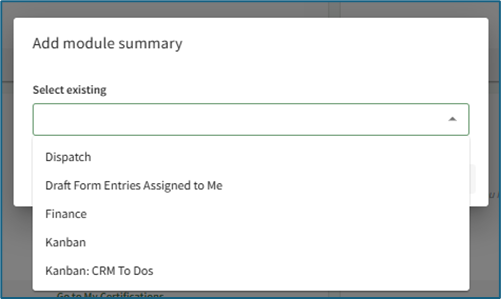
Any possible module summaries that are not yet included on the current dashboard will show in a dropdown menu on the modal.
Select the desired widget to be added to the dashboard. Multiple module summaries can be selected at once if desired.

Click the “Add Widget” button and the selected module summary will now show at the bottom of the Dashboard.
Module summary widgets can only be added to one dashboard at a time. For the widget to show on multiple dashboards, it must be added to each dashboard individually.
How To: Create a Speed Dial
To create a Speed Dial, select the Add Widget button (from the top right-hand corner of the page or the dashboard context menu accessed by the vertical three dot icon next to the Dashboard name).

This opens the Add Widget modal.

Select “Speed Dial” opening the Add Speed Dial Modal.
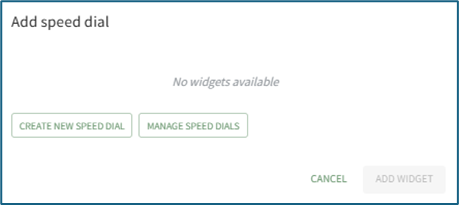
If no speed dials have been created yet on your account, the modal will state “No widgets available.” Select “Create New Speed Dial” opening the New Speed Dial Modal.

Input the speed dial title.
The title of the speed dial will be used to identify the speed dial when it is pinned to a Dashboard. It is not the name of an individual Link.
Select the desired placement (top, floating or widget) of the speed dial.
Click the “+ Add Link” button opening the New Speed Dial Link Modal.

There are three types of speed dial links: a URL website link, a KAStrack Form, or a KAStrack Document. Select the appropriate type.
If the speed dial type is a URL Link, input the link and give the link a title. If a KAStrack Document or Form type is selected, select the desired file/form from the dropdown menu and give it a title. The name of the chosen file/form is pre-filled for convenience.
Select the “Add Link” button. Once you’ve added all desired links for this speed dial, click “Confirm”. The modal will close, creating the speed dial, but the speed dial is not yet visible on the dashboard. Click the “+ Add Widget” button and select Speed Dial to open the Add Speed Dial Modal.

Now that the speed dial has been created, it will show in the select existing dropdown menu. Select the Speed Dial to show on the dashboard. Click the “Add Widget” button.
The Speed Dial will now show on the dashboard in the desired placement.
You can select multiple speed dials (if there are more than one available) from the dropdown to add them all to the Dashboard at the same time.
How To: Create a Chart Widget
To create a Chart widget, select the Add Widget button (from the top right-hand corner of the page or the dashboard context menu accessed by the vertical three dot icon next to the Dashboard name).

This opens the Add Widget modal.

Select “Chart” opening the Add Chart Modal.

Existing charts will show on the dropdown menu. Select the desired chart and click the “Add Widget” button.
Note: In order to create a Chart Widget, you must first create a chart by going to a report in the Reports Module and clicking the Chart Wizard Icon. If no charts exist in the Reports Module, the Add Chart Modal will state, “No widgets available.”
How To: Create a Chart Widget
To create a Chart widget, select the Add Widget button (from the top right-hand corner of the page or the dashboard context menu accessed by the vertical three dot icon next to the Dashboard name).
This opens the Add Widget modal.
Select “Chart” opening the Add Chart Modal.
Existing charts will show on the dropdown menu. Select the desired chart and click the “Add Widget” button.
Note: In order to create a Chart Widget, you must first create a chart by going to a report in the Reports Module and clicking the Chart Wizard Icon. If no charts exist in the Reports Module, the Add Chart Modal will state, “No widgets available.”
How To: Create a Chart Widget
To create a Chart widget, select the Add Widget button (from the top right-hand corner of the page or the dashboard context menu accessed by the vertical three dot icon next to the Dashboard name).
This opens the Add Widget modal.
Select “Chart” opening the Add Chart Modal.
Existing charts will show on the dropdown menu. Select the desired chart and click the “Add Widget” button.
Note: In order to create a Chart Widget, you must first create a chart by going to a report in the Reports Module and clicking the Chart Wizard Icon. If no charts exist in the Reports Module, the Add Chart Modal will state, “No widgets available.”
How To: Create a Chart Widget
{{@13}}
No comments to display
No comments to display