
Approve / Reject a Pending Dispatch Status Change
To approve or reject a dispatch status change, go to the Pending Approvals Page in the Dispatch Module.

Click the dispatch number or title of the dispatch whose status is pending approval, opening the Dispatch Details Page.
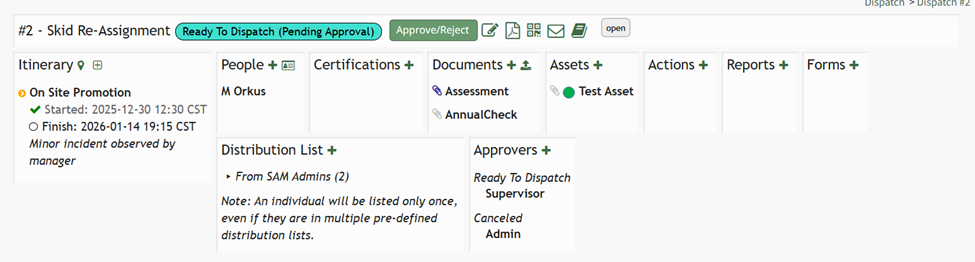
An Approve/Reject button now shows to the right of the dispatch number and title. Click the “Approve/ Reject” button opening the Approval Required Modal.
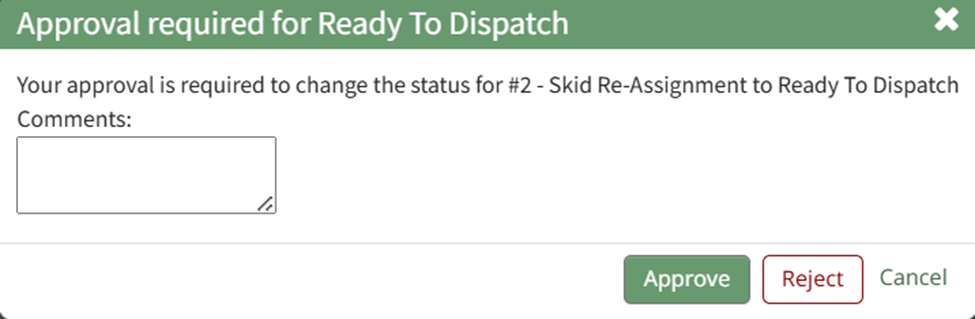
Input any comments relevant to approval / rejection and select the appropriate button.
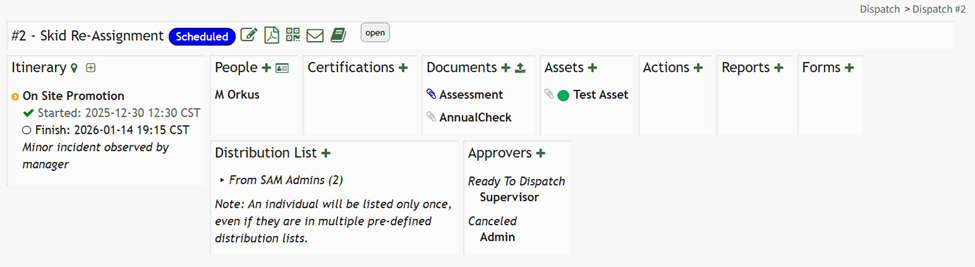
If you approve the status change, a confirmation pop up states, “Status has been approved,” and the new status shows on the Dispatch Details Page.

If you rejected the status, a confirmation pop up states, “Status has been rejected.”

The Dispatch Details Page reverts back to the previous status and the dispatch no longer shows on the pending approval page until another attempt to change the status.
No comments to display
No comments to display