
Edit a Form Entry Pending Approval
Anyone can edit a form entry if they have the permission to edit entries, regardless of the approval requirements.
To edit a form entry pending approval, go to the Home Page of the Forms Module.

Select “View Entry” from the Actions column of the Form Entries Pending Approval Table opening the view form entry modal.
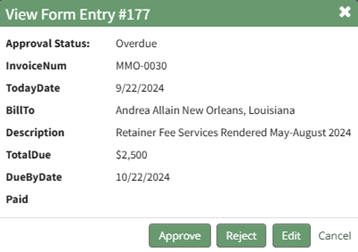
Select the “Edit” button opening the Edit Form Entry Modal.
Make any necessary edits to the entry in the modal and select “Save” when done.
No comments to display
No comments to display