
Add a Budget Approver Group in the Actions Module
To create a new budget approver group in the action module, select Settings under the Action Module on the Main Menu. Open the Budget Approvers Tab.
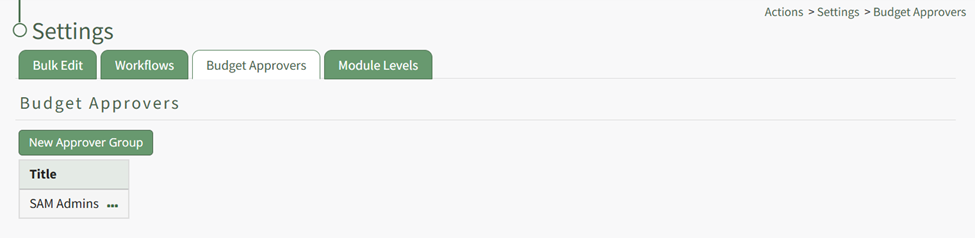
Click the “New Approver Group” button opening the New Budget Approver Modal.
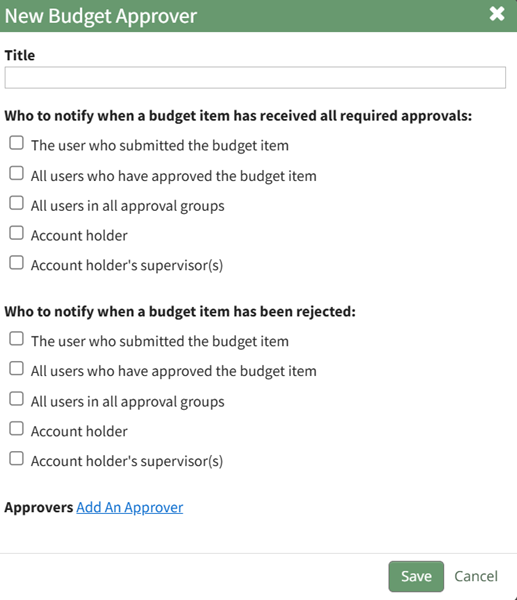
Input a title for the new budget approval group.
Use the checkboxes to identify who should be notified when a budget item has received all required approvals abd when a budget item has been rejected. Options for both fields include: The user who submitted the budget item, all users who have approved the budget item, all users in all approved groups, account holder, account holder’s supervisor(s).
Select the “Add an Approver” clickable link and the modal expands.
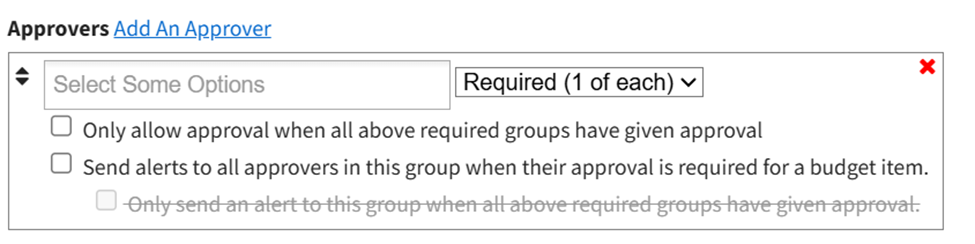
Users or roles can be selected as approvers, and approval can be optional or required for each individual. Multiple Approver Groups can be created and customized for your organizations preferences.
Checkboxes provide the option to “Only allow approval when all above required groups have given approval” or “Send alerts to all approvers in this group when their approval is required for a budget item”. If the option to send alerts when approval is required is selected, another checkbox is enabled to “Only send an alert to this group when all above required groups have given approval”.
Select “Save” and the new budget approvers groups will show in the Budget Approver Group Title Table.
No comments to display
No comments to display