
Edit An Action Group
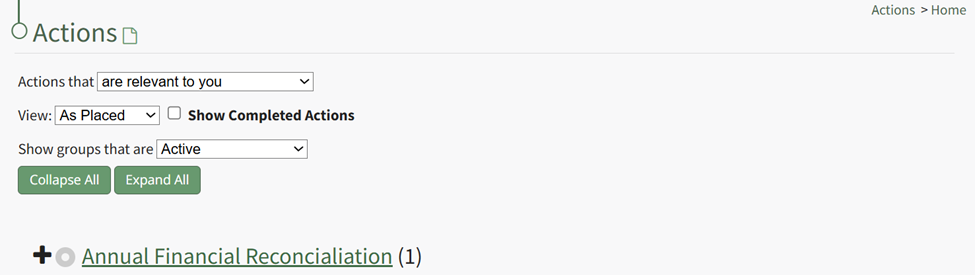
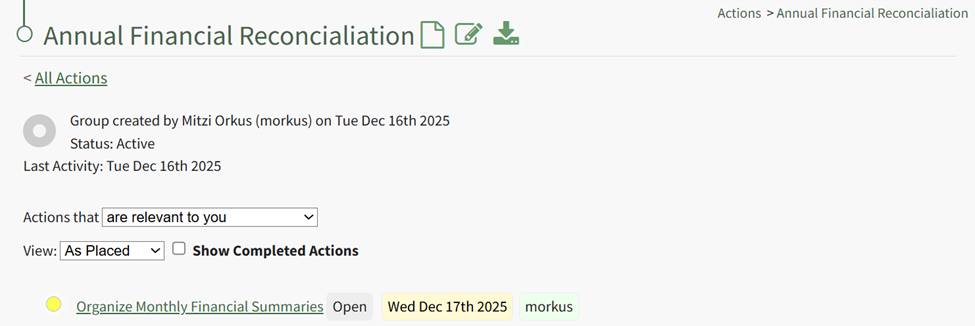
To edit a specific action group, you can click the edit icon next to the group's title on the Actions Home Page, or select the Groups Page on the Main Menu, opening the Manage Action Groups Page. Then click the three-dot icon to the right of the action group to open the Action Group Context Menu.
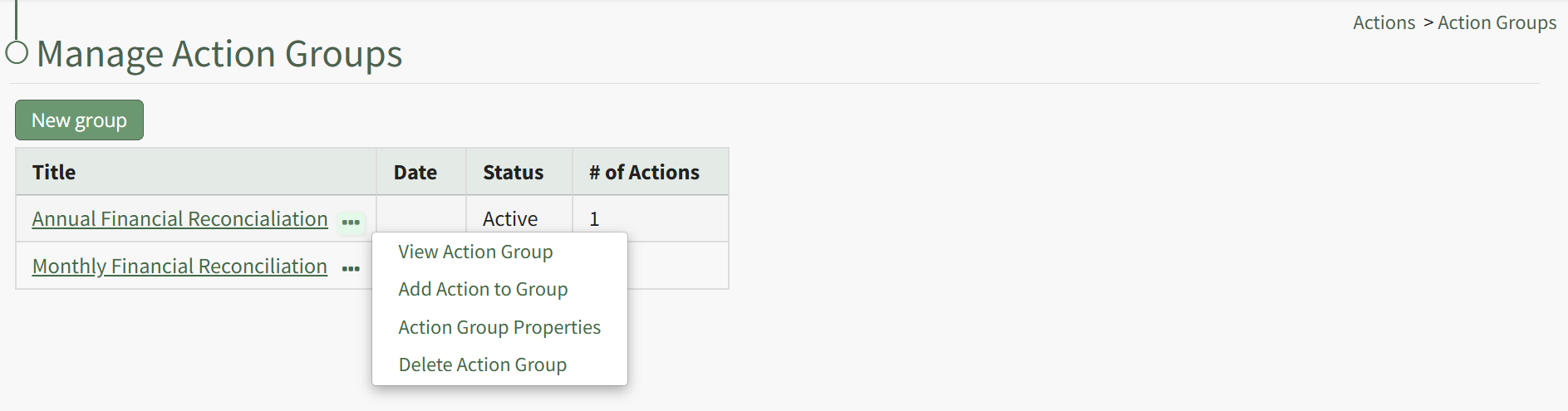
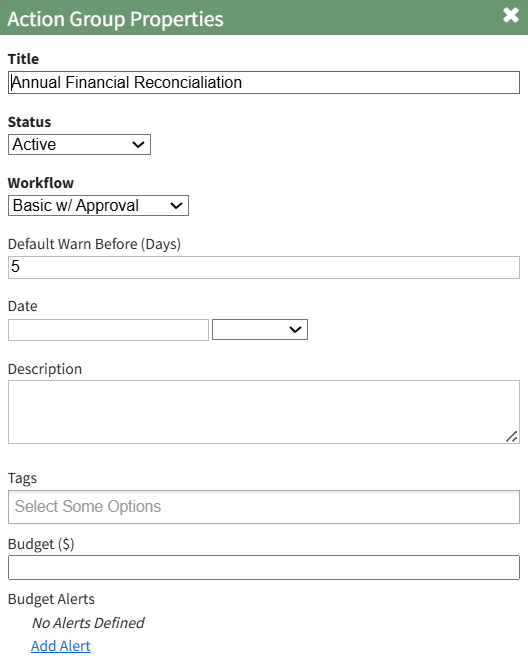
Select “Action Group Properties” from the context menu opening the Action Group Properties Modal.
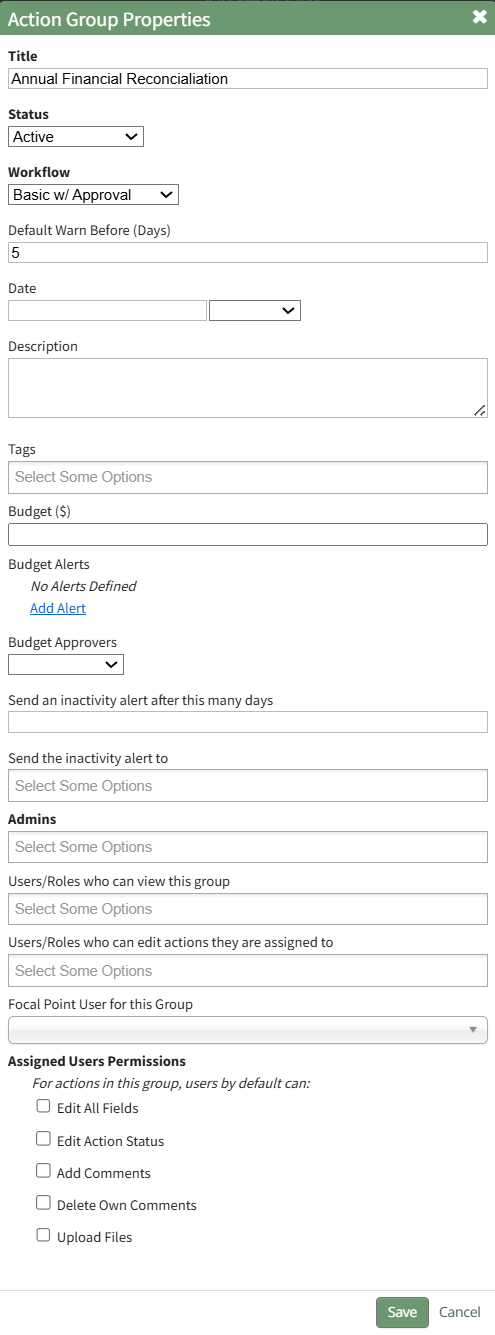
Make the desired changes to the action group. Use the Actions Group Field Input Explanations Table for information about individual field inputs.
Action Group Field Input Explanations | |
Field | Explanation |
Title | Input the title for the new action group. |
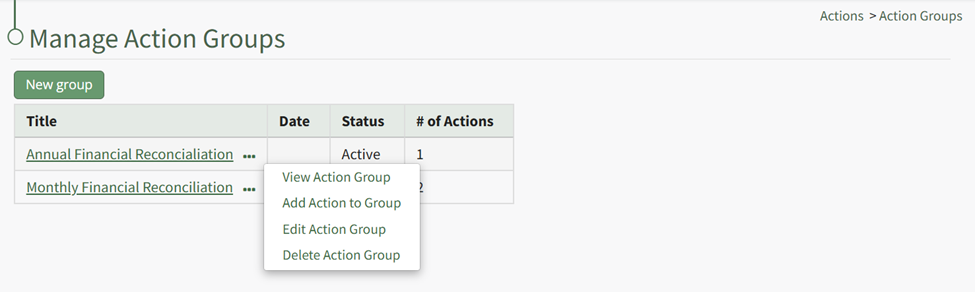
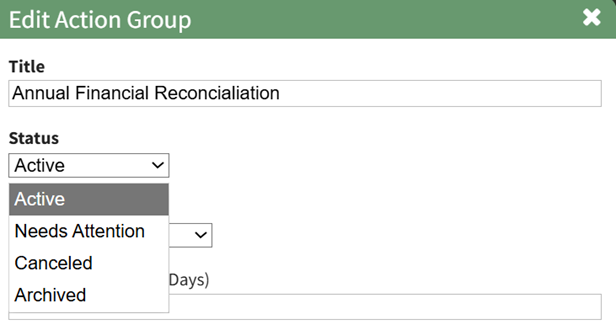
Status | An action group can be assigned a status of Active, Needs Attention, Canceled, or Archived. Select the appropriate status from the Status dropdown menu on the modal. The status of an action group is manually applied and edited. How To: Edit an Action Group StatusAction groups are manually assigned a group status than can be manually edited as needed for the action group. Default Group Status include Active, Needs Attention, Cancelled, and Archived. To change the action group status, select the Groups Page on the Main Menu, opening the Manage Action Groups Page. Clicking the three-dot icon to the right of the action group opens the Action Group Context Menu.
Select “Edit Action Group” from the context menu opening the Edit Action Group Modal.
Select the appropriate action group status from the dropdown menu provided, and select “Save”.
|
Workflow | The workflow dropdown menu will offer the system default workflows (Basic, Basic with Approval, Complex with Approval), as well as any workflows that have been created by your organization. |
Default Warn Before | Input a numerical value for the number of days a default warning will be sent. This input determines when action within the action group will turn from blue (the action is outstanding) to yellow (the action is nearing its due date). |
Date | The Action Group Date is flexible in concept and can be used as bet fit by your organization. |
Description | Input a description for the action group. |
Tags | Include any open, permissive, or restrictive tags as desired. |
Budget ($) | Leave this blank if you do not want to generate a new budget in the Finance Module for the Action Group. Input a dollar amount to create the budget. |
Budget Alerts | Click "Add Alert" in the Budget Alerts Section to create a budget alert to be associated with the action group budget. This will expand the modal displaying budget alert preferences. How To: Add a Budget Alert for an Action GroupTo add a budget alert for an action group, edit the group from the Groups Page, or go to the Actions Home Page and click the title of the action group you wish to create a budget alert for.
This opens the specific action group page. The second icon to the right of the action group header is the edit action group icon.
Select the Action Group Properties Icon, opening the Action Group Properties Modal.
Select the clickable “Add Alert” link, expanding the modal to include new fields.
The alert can be triggered by the amount remaining in the budget falling below a specified amount, or if the percentage remaining falls before a specified percentage. Budget alerts can be sent to users or roles. Input the preferred alert specifics and select add. The newly saved budget alert will show as saved in the modal.
Multiple budget alerts can be customized within the action group. |
Budget Approvers | Select the desired budget approver group from the dropdown menu. Budget approval groups at the Action Group level must be created on the Settings Page: Budget Approvers Tab. |
Send an Inactivity alert after # of days | An Action Group inactivity alert will be sent to the designated users / roles after a specified number of days of inactivity. Input a numerical value telling the system to send a notice after the specified days of inactivity. Within an action group, a workflow status change, creating or completing an action, a file upload, or action comment will reset the inactivity alert. Permission for comments to reset the inactivity alert is a customizable preference. |
Send the inactivity alert to | Input the users and roles you wish to receive the inactivity alert. |
Admins | Input the users who are to be identified as Admins for the Action Groups. |
Users / Roles who can view this group | Select the Users / Roles who can view this action group. The users / roles selected will have view only permissions for every action within the action group. |
Users / Roles who can edit their own actions | Select the Users / Roles who can edit their own actions. The users / roles selected will have the ability to edit any actions they created or are assigned to in the action group. |
Focal Point User For this Group | Identify the focal point user of the group. A group focal point will be able to see actions on the Action Group Summary page. Viewing an actions detail page will be dependent on their permissions. Organization can utilize this field to identify a key contact for an action group. If this action group is being utilized for certification or training processes, using the relevant individual’s name as the focal point provides a database reference that enables reports and organizational capabilities. Only one user can be designated as the focal point. |
Assigned User Permissions Section The permissions established in this section will be applied to all users in the group by default. | |
Edit All Fields | Selecting the "Edit All Fields" checkbox will remove all other checkboxes from the modal and will give all users in the action group the ability to edit action status, add comments, delete own comments, and upload files. |
Edit Action Status | Selecting the "Edit Action Status" checkbox will give all assigned users in the action group the ability to edit the action status. |
Add Comments | Selecting the "Add Comments" checkbox will give all users in the action group the ability to add comments to an action. |
Delete Own Comments | Selecting the "Delete Own Comments" checkbox will give all users in the action group the ability to delete their own comments made regarding an action. |
Upload Files | Selecting the "Upload Files" checkbox will give all users in the action group the ability to upload files to an action. |


Select the Save button when done making field changes, and the action group is now edited.
No comments to display
No comments to display