
Designate an Individual a Hidden User on the Users Table
Designating an individual as a hidden user hides their User Roles and Certifications Report within the People Module. When reports are run on all users in the Reports Module, hidden users will be included in the report.
To designate an individual as a hidden user on the user table, open the Users Page in the People Module on the Main Menu. Click the three-dot icon to the right of the user you wish to designate as hidden opening the Users Table Context Menu.
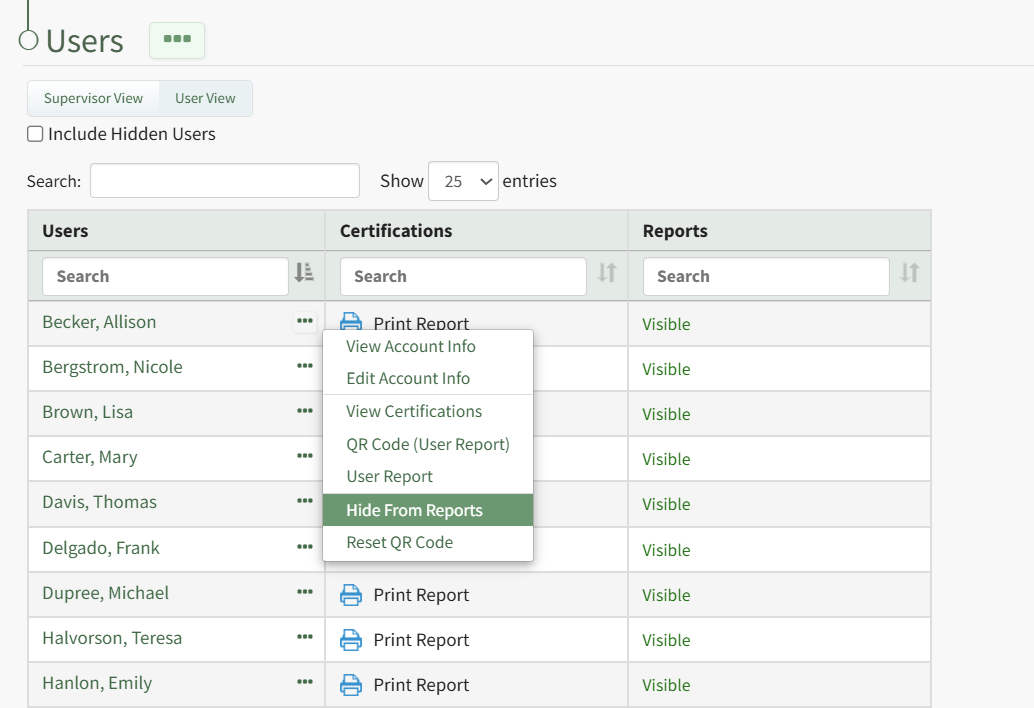
Select "Hide from Reports" from the context menu and the user is no longer visible on the Users Table unless the Include Hidden Users checkbox has been selected.
No comments to display
No comments to display