
My Accounts Page: Notifications History Tab
The Notifications History Tab shows a user the chronology of notifications that have been received and sent in the system.
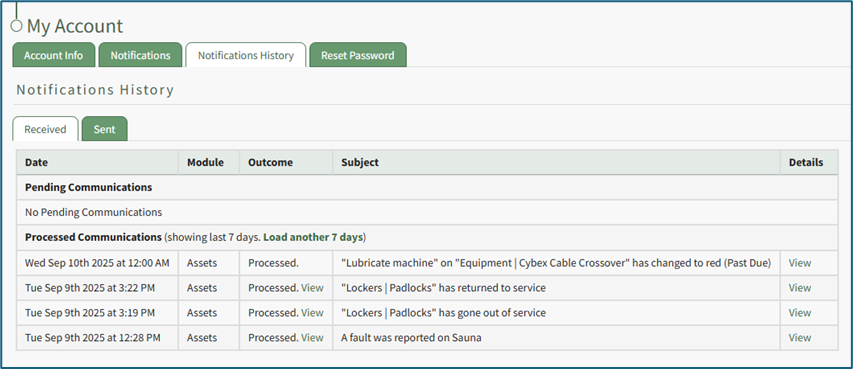
The notifications history is shown in table format. There is both a Received and Sent Tab.
The Received Communications Table separates Pending and Processed Communications. The columns show the date and module communications occurred in, the outcome of the attempt, the subject, and has a clickable link to view details.
Selecting “View” in the Outcome column opens the Outcome Modal showing who the email was sent to, the result, when it was sent, and if the read receipt has been received.
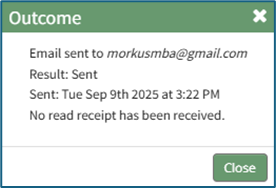
Selecting “View” in the Details column opens the View Communication Modal which states the subject of the notification and provides a clickable link to view the asset.
The default history shown for received communications is the past 7 days. Click “Load another 7 days” to extend the notification history another week. KAStrack will state how many days of historical communications are showing.\

If there is no communication history for a seven-day period, KAStrack will state that there were no processed communications. Note: KAStrack can show all history since account creation.

The Sent Communications Table similarly shows all Sent Communications for the previous 7 days.
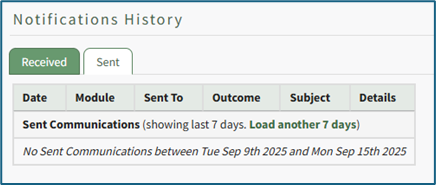
Click “Load another 7 days” to extend the notification history another week. KAStrack will state how many days of history are showing. If there is no sent communication history for a seven-day period, KAStrack will state that there were no sent communications.
No comments to display
No comments to display