
Accounts Page Export Tab
The Export Tab allows for the transfer of account information from KAStrack to a CSV file. There are checkboxes that designate whether to include archived and/or inactive accounts within the export.
Only individuals with an Admin module level access will see the Export Tab.
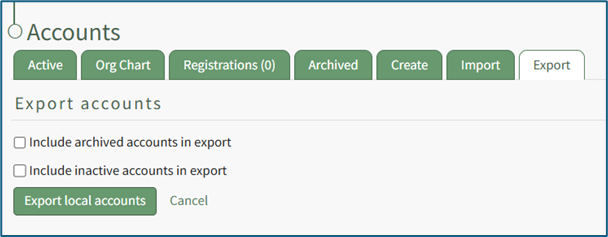
If utilized, Export will create a CSV file with all possible fields in the KAStrack system, even fields not being utilized by your organization.
How To: Export User Account Information
Open the Export Tab on the Accounts Page in the Accounts Module.

There are two checkboxes that allow for customization of your export. Both or neither can be included.
Select “Include archived accounts in export” to include archived accounts in your export. Select “Include inactive accounts in export” to include inactive accounts in your export.
Click “Export local accounts” and a CSV file will automatically be downloaded to your personal device.
No comments to display
No comments to display