
Understanding the Integration between Action Groups and Finance Module Budgets
The Actions Module has the ability to link action groups with budgets in the Finance Module and new budgets can automatically be created when new Action Groups are created by assigning a dollar amount in the New Action Group Modal.
When creating new Action Groups, the New Action Group Modal allows for the input of a budget amount, for budget alerts to be added, and budget approvers to be designated.
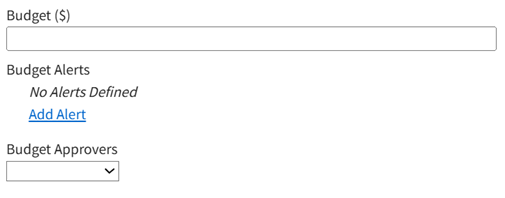
Any budget can have customized alerts that notify individuals or certification roles when the amount or percentage remaining of a budget falls below a specified threshold. The Budget Alerts feature permits the user to designate a threshold for this alert. Selecting this option will have KAStrack send an alert to a designated user if the budget amount or percentage (selected from a drop-down list) falls below an amount set by the user. Budget Alerts can be sent to users or roles.
How To: Add a Budget Alert for an Action Group
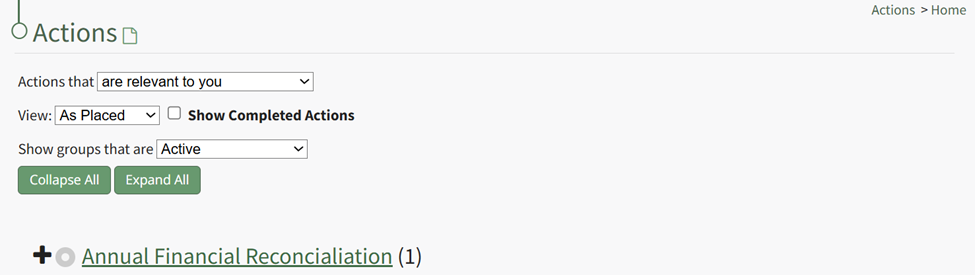
To add a budget alert for an action group, edit the group from the Groups Page, or go to the Actions Home Page and click the title of the action group you wish to create a budget alert for.
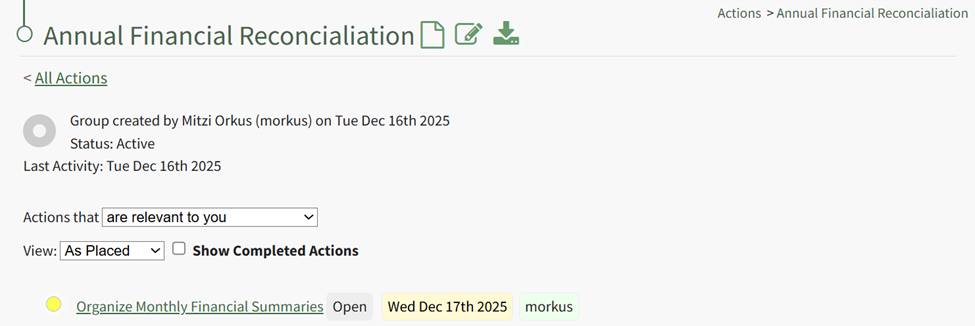
This opens the specific action group page. The second icon to the right of the action group header is the edit action group icon.
Select the Action Group Properties Icon, opening the Action Group Properties Modal.
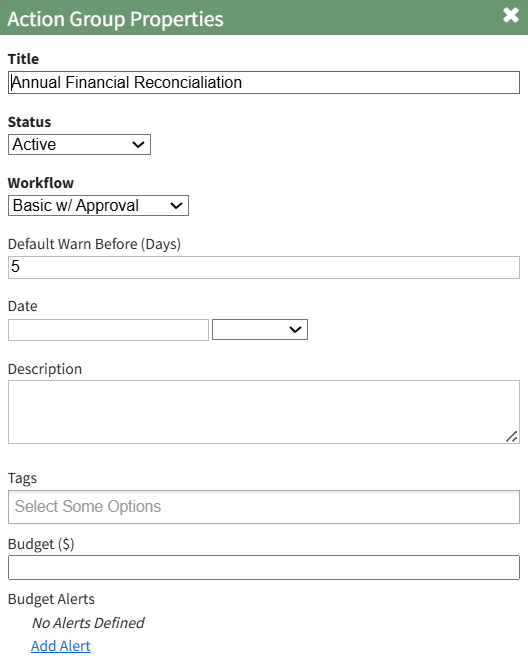
Select the clickable “Add Alert” link, expanding the modal to include new fields.

The alert can be triggered by the amount remaining in the budget falling below a specified amount, or if the percentage remaining falls before a specified percentage. Budget alerts can be sent to users or roles.
Input the preferred alert specifics and select add. The newly saved budget alert will show as saved in the modal.

Multiple budget alerts can be customized within the action group.
Please refer to the Finance Module Book in the User Manual for a better understanding of budgets, budget items, and the budget item approval process.
No comments to display
No comments to display