
Understanding Budget Item Approval and Approval Notifications
Budget items do not require approval by default. There is an ability to customize approvals. Approvers can be individuals or certification roles, and can be required or optional. If a certification role is required to approve a budget item, approval can be granted if one individual with the certification role approves the item or all can be required to approve the item as well.
There are two checkboxes associated with adding an approver, although neither is required. The first is in regards to when approval will be given. The “Only allow approval when all above required groups have been given approval” checkbox will not mark a budget item as approved until all required groups have approved the item.
The second checkbox impacts when alerts regarding a budget will be sent. The “Send alerts to all approvers in this group when their approval is required for a budget item” opens an additional checkbox when selected. Select the “Only send an alert to this group when all above required groups have been given approval” if you want the alert set after all required signatures have been received.
There are five options of who the system should notify when a budget has received all required approvals or when it has been rejected: the user who submitted the budget item, the users who have approved the budget item, all users in all approval groups, the account holder, and the account holder’s supervisor(s). Multiple, all, or no checkboxes can be selected.
How To: Set / Edit a Budget's Approvers and Approval Notifications
You can only edit approvers and approval notifications for an active budget.
To set or edit a budget’s approvers and / or approval notifications, go to the Active Tab of the Budgets Page in the Finance Module. Select the check icon in the Actions column of the Active Accounts Table.
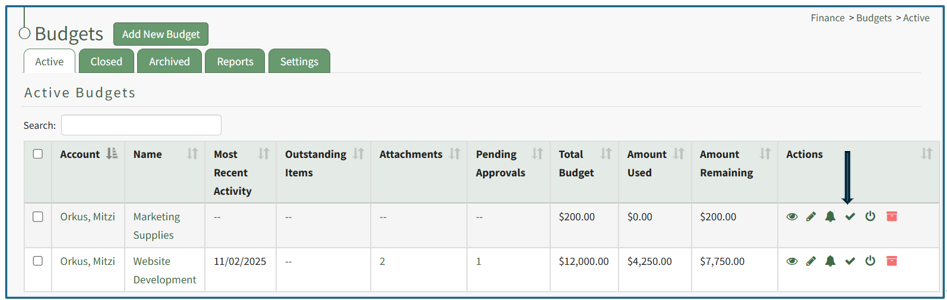
This opens the Edit Approvers Modal.

There are five options of who the system should notify when a budget has received all required approvals or when it has been rejected: the user who submitted the budget item, the users who have approved the budget item, all users in all approval groups, the account holder, and the account holder’s supervisor(s). Multiple, all, or no checkboxes can be selected.
To add an approver, click the “+ Add An Approver” button and the modal expands.
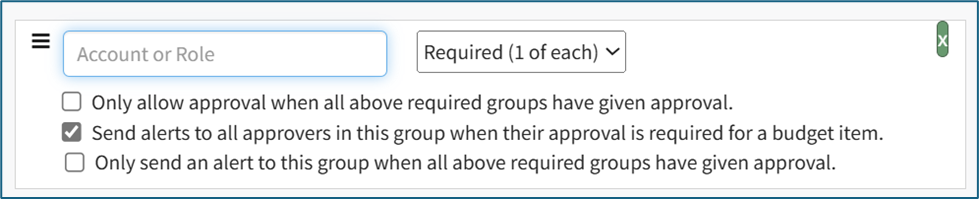
Add an individual account or a certification role and identify if their approval is required or optional. Multiple approvers can be added in this expansion, or you can click “+Add an Approver” again if the permissions/requirements need to be different for the different approvers.
There are two checkboxes associated with adding an approver. The first is in regard to when approval will be given. The “Only allow approval when all above required groups have been given approval” checkbox will not mark a budget item as approved until all required groups have been approved.
The second checkbox impacts when alerts regarding a budget will be sent. The “Send alerts to all approvers in this group when their approval is required for a budget item” opens an additional checkbox when selected. Select the “Only send an alert to this group when all above required groups have been given approval” to send an alert when a required signatures have been received.
After making the appropriate selections, the modal will state how many budget items will be affected by the changes being made.

You have the choice to “Mark as Approved any budget items that will become fully approved when this form is saved” or to “Clear existing approvals for any budget items that will become fully approved when this form is saved.” You cannot select both.
Once all changes to approvers and approval notifications for the budget have been made, select the “Save” button and you will return to the Active Tab of the Budgets Page.
How To: Submit a Budget Item for Approval
Budget items can only be submitted for active budgets. To submit a budget item for approval, go to the Active Tab of the Budgets Page in the Finance Module. Open the specific budget with the budget item that needs to be submitted for approval either by clicking the name of the budget or the eyeball icon in the action column of the desired budget.

This opens the budget, showing the Budget Item per Budget Table.

To submit the budget item for approval, select the clickable link “Submit for Approval” in the Approval Status column.

The approval status now shows how many of the required approvals have been granted. The comment icon shows the date and time the budget item was submitted for approval.
How To: Unlock a Submitted Budget Item for Editing
In order to edit an approved budget item, any existing approvals and rejections regarding the budget item will be cancelled. The budget item must then be unlocked before editing is possible.
To unlock a submitted budget item for editing, select the appropriate budget from the Active/Closed/Archived Budget tab. Click the budget title to be taken to the Budget Item Per Budget Table.
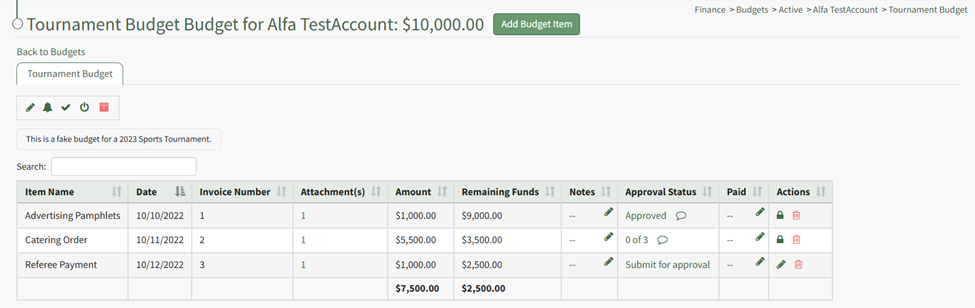
Click the lock icon in the actions column of the budget item you wish to edit.
The lock icon opens a Confirmation Modal which states, “Locked for editing. Would you like to cancel approvals and rejection and unlock editing?
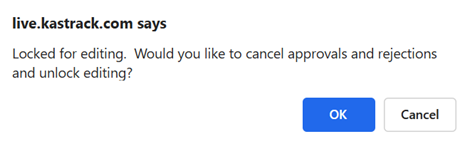
Select OK.
The lock icon is now replaced with the pencil icon in the actions column and the budget item is unlocked.

The pencil icon opens the Edit Budget Item Modal if clicked.
How To: Edit a Budget Item
Only active budgets can be edited. To edit a budget, go to the Active Tab of the Budgets Page in the Finance Module. Click the pencil icon in the Actions column of the Active Table.

This opens the Edit (BUDGET NAME) Modal.

Make any desired changes to the Budget Name, Description, Account, Amount, or Tags associated with the budget.
When done making changes, click the “Save” button and return to the Active Tab of the Budgets Page.
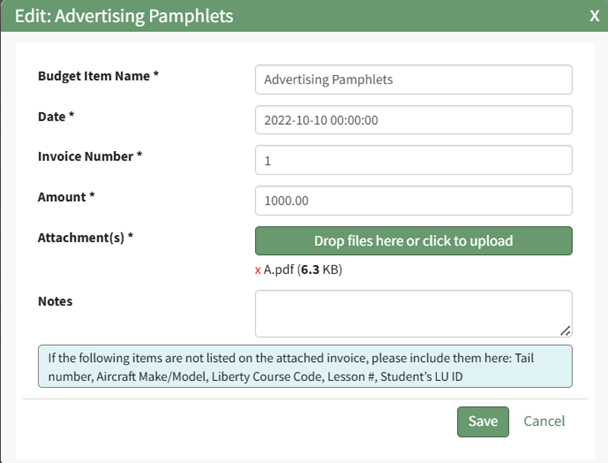
How To: Resubmit a Budget Item for Approval after Edits Are Made
A Budget Item must be unlocked for edits to be made.
How To: Unlock a Submitted Budget Item for Editing
In order to edit an approved budget item, any existing approvals and rejections regarding the budget item will be cancelled. The budget item must then be unlocked before editing is possible.
To unlock a submitted budget item for editing, select the appropriate budget from the Active/Closed/Archived Budget tab. Click the budget title to be taken to the Budget Item Per Budget Table.
Click the lock icon in the actions column of the budget item you wish to edit.
The lock icon opens a Confirmation Modal which states, “Locked for editing. Would you like to cancel approvals and rejection and unlock editing?
Select OK.
The lock icon is now replaced with the pencil icon in the actions column and the budget item is unlocked.
The pencil icon opens the Edit Budget Item Modal if clicked.
How To: Edit a Budget Item
Only active budgets can be edited. To edit a budget, go to the Active Tab of the Budgets Page in the Finance Module. Click the pencil icon in the Actions column of the Active Table.
This opens the Edit (BUDGET NAME) Modal.
Make any desired changes to the Budget Name, Description, Account, Amount, or Tags associated with the budget.
When done making changes, click the “Save” button and return to the Active Tab of the Budgets Page.
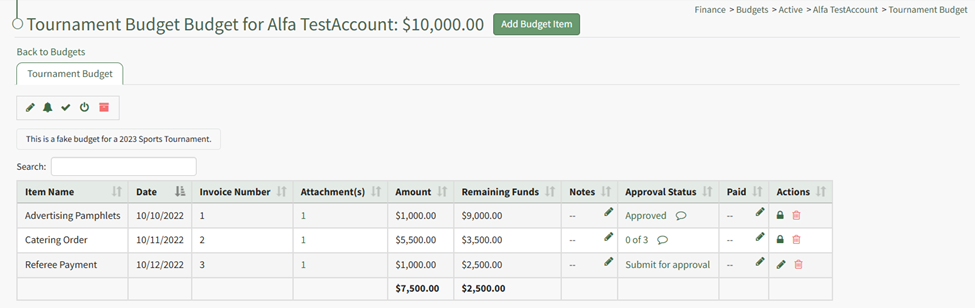
Unlocking the budget item allows the pencil icon to be selected for edits to the budget.
How To: Edit a Budget Item After Submission for Approval
Go to the Active/Closed/Archived Budget Table and click the title of the budget you wish to edit, opening the Budget Item Per Budget Table.
If the budget item has already been submitted for approval, it must be unlocked first before edits can be made.
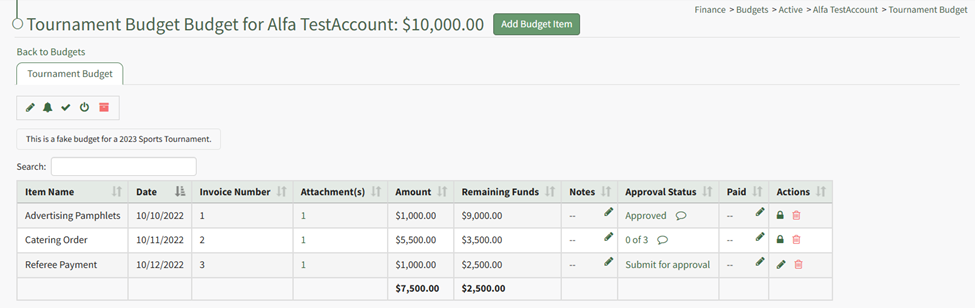
Unlock the approved budget item.
How To: Unlock a Submitted Budget Item for Editing
In order to edit an approved budget item, any existing approvals and rejections regarding the budget item will be cancelled. The budget item must then be unlocked before editing is possible.
To unlock a submitted budget item for editing, select the appropriate budget from the Active/Closed/Archived Budget tab. Click the budget title to be taken to the Budget Item Per Budget Table.
Click the lock icon in the actions column of the budget item you wish to edit.
The lock icon opens a Confirmation Modal which states, “Locked for editing. Would you like to cancel approvals and rejection and unlock editing?
Select OK.
The lock icon is now replaced with the pencil icon in the actions column and the budget item is unlocked.
The pencil icon opens the Edit Budget Item Modal if clicked.
How To: Edit a Budget Item
{{@308}}
The lock icon is now replaced with the pencil icon in the actions column, and the budget item is unlocked.

The pencil icon opens the Edit Budget Item Modal if clicked.
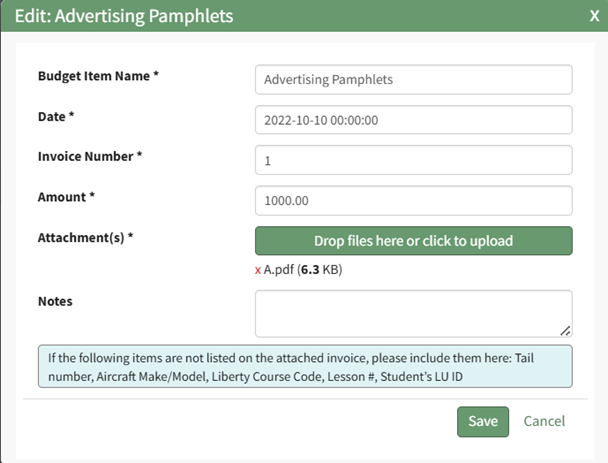
Make the necessary changes and select Save for your edits to be recorded.
You must resubmit your budget items for approval.
How To: Resubmit a Budget Item for Approval after Edits Are Made
A Budget Item must be unlocked for edits to be made.
How To: Unlock a Submitted Budget Item for Editing
{{@314}}
Unlocking the budget item allows the pencil icon to be selected for edits to the budget.
How To: Edit a Budget Item After Submission for Approval
{{@316}}

Once edits have been made, the budget item should be resubmitted for approval. Click the “Submit for approval” link in the Approval Status column.
The Approval Status changes, now showing how many approvals have been received and the total needed. The budget item is locked again.

Once edits have been made, the budget item should be resubmitted for approval. Click the “Submit for approval” link in the Approval Status column.
The Approval Status changes, now showing how many approvals have been received and the total needed. The budget item is locked again.
No comments to display
No comments to display