
Assets Module Summary
The Assets Module is comprised of various components (folders, entities, collections of tasks, etc.) that are used to designate, manage, and track both recurring company tasks, physical assets, and maintenance that users are assigned ownership/responsibility for. Each asset can have components, and associated tasks with customizable triggers can be created for each asset. Multiple users can have responsibility for the same asset, and management has the ability to track an individual’s completion of their personal task schedule (assigned tasks).
Asset components are sub-categorized items that are considered to be part of a larger asset. Asset components are listed underneath the asset with which they are associated in table format on the My Assets page.
Ownership can be assigned to an entire asset or individual components.
Assets or their components within the asset can have meters associated with them. A meter can be a literal meter but can also be a figurative representation of any device whose usage is being tracked. Meters within KAStrack have customizable units. Examples include but are not limited to odometers for mileage, quantities consumed or produced, hours of usage, cycles of use, number of revolutions, etc.
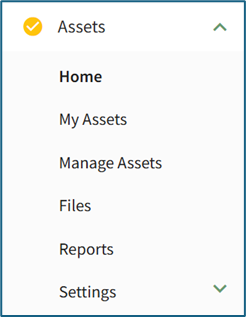
There are several Asset Pages displayed on the Main Menu. Visibility is dependent on a user's access level. The Assets Module Pages Explanation Table gives details on each page and its functional purpose.
Assets Module Page Explanations Table | |
Page | Explanation |
The Home page in the Assets Module displays a user’s Upcoming Tasks Page with work-orders for any upcoming, deferred, or past due tasks that are associated with the assets the individual has been assigned responsibility for. Upcoming Tasks are displayed in tabular format. | |
The My Assets Page in the Assets Module displays all user assets in table format and allows the user to search for assets via the tag/filter box at the top of the screen. | |
The “Manage Assets” Page in the Assets Module is where individuals with appropriate permissions can create new assets/components and modify existing ones. | |
The Files Page in the Assets Module displays any files that have been uploaded. Any files included in the Assets Module can be viewed from the Assets Files Page. Files uploaded in the Asset module are not automatically included the Documents Module, although a file can be manually added to both. | |
The Reports Page in the Assets Module is a legacy page, used prior to the creation of the Reports Module, and is no longer customizable. The Reports Page allows the user to view reports generated by KAStrack. If your company uses BowTieXP, you can export information from the Assets Module Reports Page to create a systems import for BowTieXP. | |
The Settings Page under the Assets Module allows a user with appropriate permissions to designate specific asset parameters. | |