
Account Fields Tab
The Account Fields Tab in the Site Settings Module shows the default fields used in tables in several modules in the KAStrack system and is broken into two groups: System User Account Information Fields and Custom/Additional User Account Information Fields. Permissions are set for these fields on the Account Fields Tab, and custom fields are added/edited/deleted there as well.
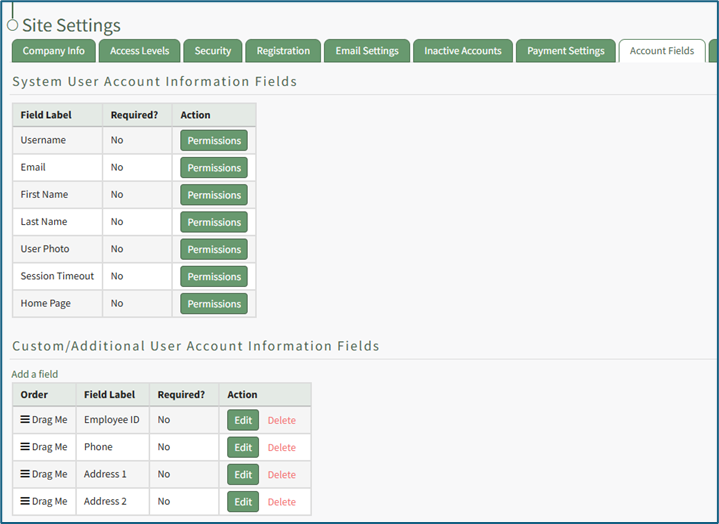
System User Account Information Fields
System User Account Fields are default fields that cannot be edited or deleted because they are essential for software functionality and are referenced in various places across KAStrack.
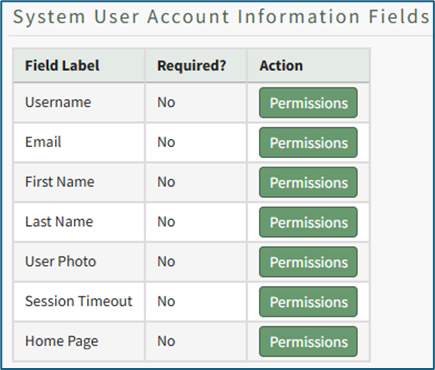
Permissions for system user account information fields can be changed for different access levels.
Session Timeout is a KAStrack managed setting only that coincides with security best practices. Users will receive a 20-minute warning and a session will timeout after 30 minutes of inactivity. When a user logs back into the system, they will be taken back to the page they were on when the session timeout occurred.
WIKI LINK HOW TO: EDIT PERMISSIONS FOR SYSTEM USER ACCOUNT INFORMATION FIELDS
Custom/Additional User Account Information Fields
Custom/Additional User Account Information Fields can be edited or deleted because they are not essential to the KAStrack system and can be removed without issue.
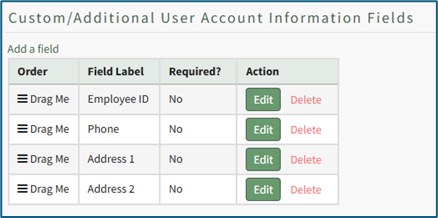
A new KAStrack subdomain installation will have additional information fields already created: Employee ID, Phone, Address 1 and Address 2. These information fields can be edited to your preference.
WIKI LINK How To: Add a Custom/Additional User Account Information Fields
WIKI LINK HOW TO EDIT CUSTOM/ADDITIONAL USER ACCOUNT INFORMATION FIELD
WIKI LINK HOW TO DELETE CUSTOM / ADDITIONAL USER ACCOUNT INFORMATION FIELD