
Submit a Certification
A user can submit a certification from the Submit Certification tab on the My Account Page in the People Module.
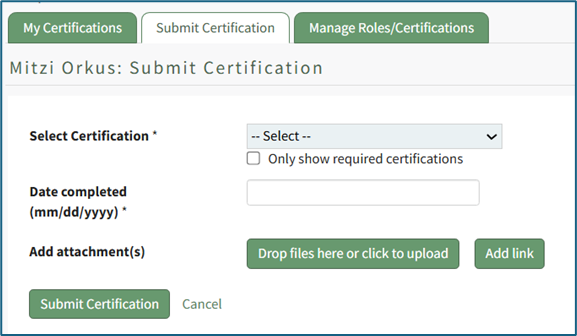
To submit a certification, select the certification to be submitted from the dropdown list. The “Only show required certifications” checkbox can be selected for ease.
Placing the cursor in the Date completed textbox opens a calendar modal allowing a user to select the certification completion date. The date can also be entered manually in MM/DD/YYYY format.
Add attachments by selecting the “Drop Files Here or Click to Upload” button.
Add a link by selecting the “Add Link” button.
Select the “Submit Certification” button to submit or “Cancel” to return to the My Certifications tab on the My Account Page.