
Resubmit a Budget Item for Approval after Edits are Made
A Budget Item must be unlocked for edits to be made.
How To: Unlock a Submitted Budget Item for Editing
WIKI LINK HOW TO: UNLOCK A SUBMITTED BUDGET ITEM FOR APPROVAL{{@314}}

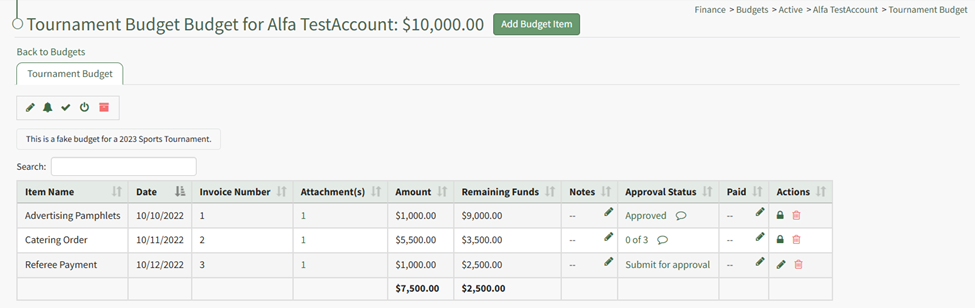
Unlocking the budget item allows the pencil icon to be selected for edits to the budget. WIKI
How HOWTo: TO:Edit EDITa ABudget BUDGETItem ITEMAfter AFTERSubmission SUBMISSIONfor FOR APPROVALApproval
{{@316}}

Once edits have been made, the budget item should be resubmitted for approval. Click the “Submit for approval” link in the Approval Status column.
The Approval Status changes, now showing how many approvals have been received and the total needed. The budget item is locked again.
