
Delete an Asset or Component
To delete an asset or component, it must first be archived. WIKI
How HOWTo: TO:Archive ARCHIVEan ANAsset ASSETor OR COMPONENTComponent
{{@498}}
To delete an archived asset or component, open the Manage Assets Page of the Assets Module. Select the three dot (…) icon to the right of the asset/component that you wish to delete, opening the context menu.
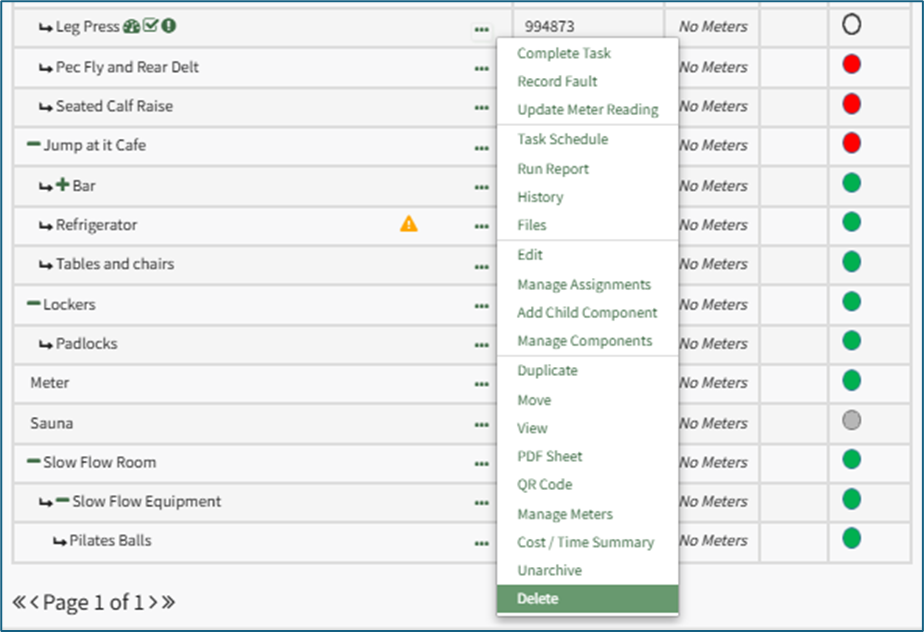
Select “Delete” opening a Confirmation Modal that states, “Please confirm that you wish to delete ASSET NAME. This will also delete any tasks and subcomponents.”
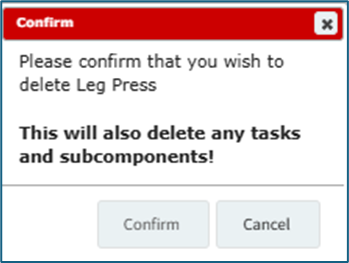
Select “Confirm” and the asset/subcomponent will no longer show in the Asset Table on the Manage Assets Page.