
Create a New Dispatch
To create a new dispatch, go to the Dispatch Module Home Page.

Click the “New Dispatch” button, which automatically opens to a new dispatch details page.

Select the edit dispatch properties icon to the right of the dispatch status to open the EditDispatch DispatchProperties Modal.
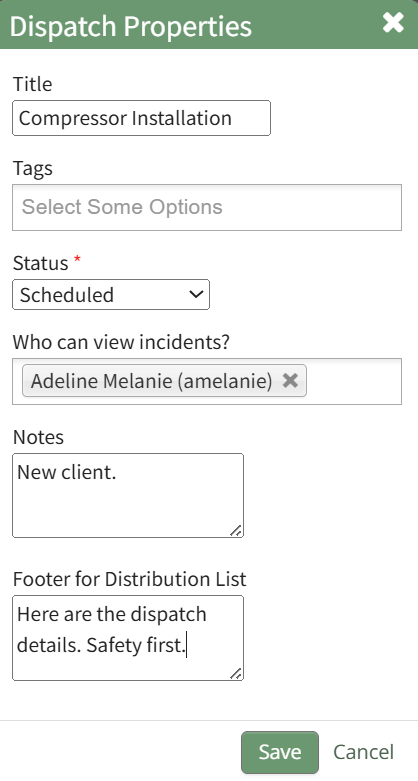
Input a dispatch title and appropriate tags. Select the dispatch status and who can view incidents from the menu provided. Input and relevant dispatch notes and a footer for the distribution list if desired. Select the “Save” button and the changes are now reflected on the Dispatch Details Page.
A title field is not required for a dispatch, as the dispatch number is the unique identifier.

There are ten sections that comprise a dispatch. An explanation of each section is included in the table below.
Dispatch Detail Page Section Explanations | |||||||||||
Section | Explanation | ||||||||||
Itinerary | The itinerary section can be added to the dispatch details page, outlining any activity and waypoints associated with the dispatch.
How To: Add a Waypoint to an ItineraryHow To: Add an Activity to a Dispatch Itinerary{{@668}} | ||||||||||
People | People can be added to the dispatch details page. How To: Add People to a Dispatch{{@676}} Once added, hovering your cursor over the displayed name shows icons that open the individual user page, that edit the People attachment, and delete the People attachment from the dispatch details. | ||||||||||
Certifications | Certification roles can be added to the dispatch details page. How To: Add Certifications to a Dispatch{{@671}} | ||||||||||
Documents | Documents can be added to the dispatch details page. How To: Add KAStrack Documents Module Files to a Dispatch{{@674}} Once added, hovering your cursor over the displayed name shows icons that view the attached file, that edit the Documents attachment, and delete the Documents attachment from the dispatch details. | ||||||||||
Assets | Assets can be added to the dispatch details page. How To: Add Assets to a Dispatch{{@670}} | ||||||||||
Actions | Actions can be added to the dispatch details page. How To: Add Actions to a Dispatch{{@863}} | ||||||||||
Reports | Reports can be added to the dispatch details page. How To: Add Reports to a Dispatch{{@677}} | ||||||||||
Forms | Forms can be added to the dispatch details page. How To: Add Forms to a Dispatch{{@673}} | ||||||||||
Distribution List | Users and certification roles can be added to the dispatch distribution list. How To: Add Distribution Lists to a Dispatch{{@672}} Pre-defined Distribution Lists can be created on the Settings Page of the Dispatch Module and added to the dispatch. How To: Create a Pre-Defined Distribution List{{@684}} | ||||||||||
Approvers | Approvers can be added to a dispatch and approval can be required for any dispatch status change. How To: Add Approvers to a Dispatch{{@669}} Once added, hovering your cursor over the displayed name shows icons that edit and delete the approver attachment to the dispatch details. | ||||||||||


