
Inventory Database Explanation
The creation of an inventory requires integration with underlying databases that have been created for the purpose of inventory creation. Inventories are functionally dependent on a locations database and a stock database. A unique items database is also an option, but not a requirement for an inventory to function properly.
Databases Integrating with the Inventory Module | ||
Database | Field Requirements | Notes |
Locations Database | None | A database must be selected as a locations inventory. Multiple databases can be utilized if desired. There are no fields that must be specifically included for functionality. |
Stock Database | Location | All inventories are required to integrate with a stock database. An explanation of each required field has been provided below.
** Part Type is only a required field if you have both a stock and a unique database. |
Inventory Item (Title) | ||
Quantity | ||
Part Type** | ||
Unique Item Database | Inventory Item (Title) | Integrating with a unique item database is optional. An explanation of each required field has been provided below. |
Unique Item Identifier | ||
Inventory items entered into the stock database and the unique items database are combined and visible in the Inventory Item Table within the specific Inventory they have been integrated with.

Locations Database
An organization has the freedom to curate how the location database works for best fit by creating one or more databases that define the location of an inventory item. There are no required fields for this database. Possible field names for your locations database include but are not limited to, site, building, position, shelf, bin, etc. Images can be used to visually express inventory items on location.
At least one database must be selected as a location database when creating an inventory.
The Locations Database should be created on the Home Page of the Database Module.
How To: Create a Database
WIKI{{@329}}
How HOWTo: TO:Add CREATEa ADatabase DATABASEField
{{@329}}
How LINKTo: HOWImport TO:Fields CREATEfrom DATABASEa FIELDS
{{@339}}
Stock Database
The Stock Database is created for general or stock inventory items that do not have a unique identifier. The fields included in the Stock Database will show on the modal for each stock item in the inventory. All inventories are required to integrate with a stock database.
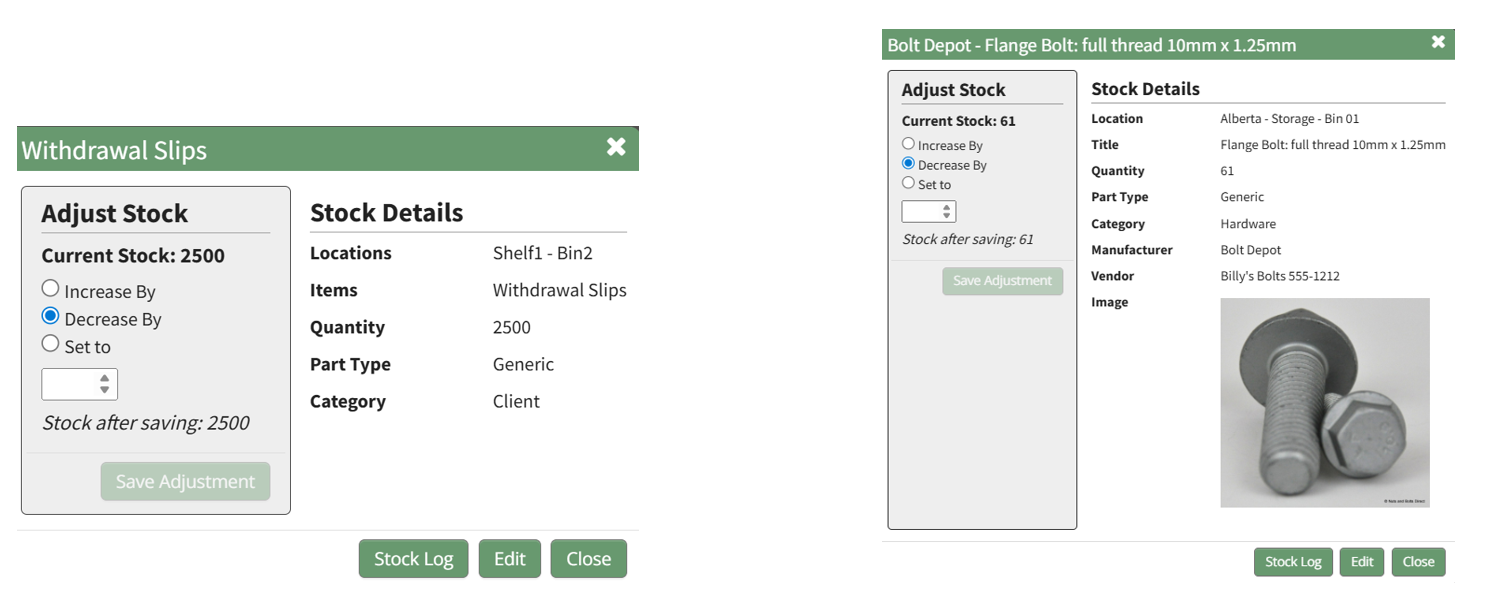
Your stock database can include a variety of fields, but for the Inventory Module to function properly there are required fields.
Stock Database Requirements | |
Required Fields* | Explanation |
Location | Inventory location can be defined through a single database, or multiple databases if desired. |
Inventory Item Title | This field will be used to identify the stock inventory item. Some examples of possible field names include title, item, part, etc. The Title will be comprised out of fields in the stock database. |
Quantity | This field will state the number of stock items currently in the inventory. |
Part Type | A inventory item must be specified as generic or unique if the inventory is integrated with a unique items database. Part Type is only a required field if you have both a stock and a unique database. |
* The actual field name for required fields can be customized to your preference. | |
How To: Create a Stock Database
{{@459}}
Unique Items Database
The unique items database is generated if you have inventory items that have a unique identifier, such a serial number. The fields included in the Unique Items Database will show on the modal for each unique item in the inventory. Inventories are not required to have a unique items database to function properly.
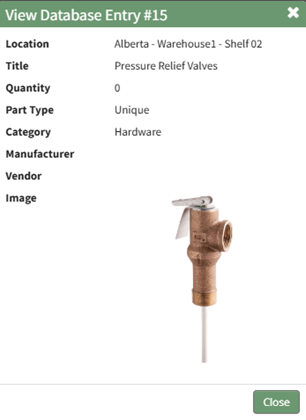
Your unique items database can include a variety of fields, but for the Inventory Module to function properly, it must have field(s) that identify the inventory item (title) and field(s) that are used to identify the unique item.
How To: Create a Unique Items Database
{{@460}}