
Forms Home Page
The Home Page of the Forms Module contains the Forms Table, where all existing forms built within your organization’s subdomain are stored and can be accessed.
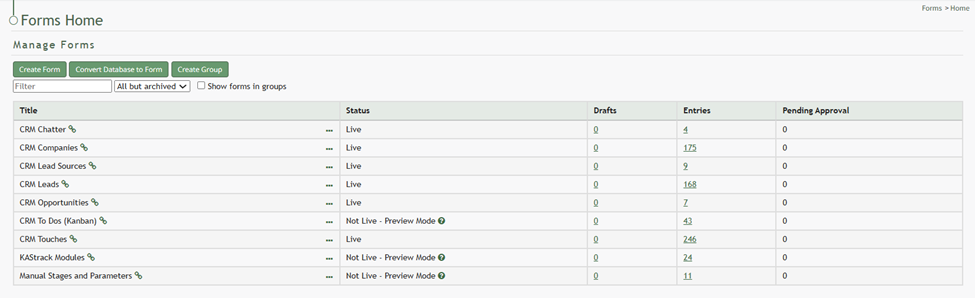
A “Show forms in groups” checkbox allows a user to customize their view of the Forms Home Page for efficient use.
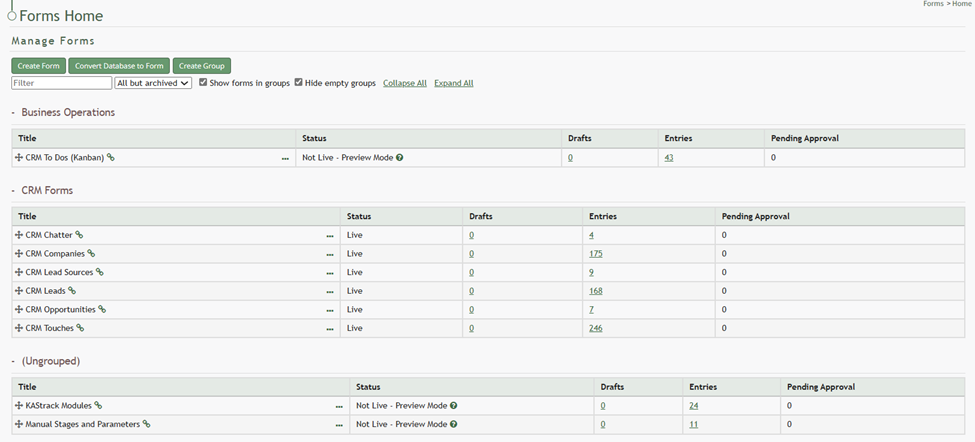
When Forms are displayed in groups, quick links allow you to collapse and expand all groups as well as hide empty groups that do not currently contain Forms.
Forms can be filtered by all but archived, preview mode, live, closed, and archived.
If there are existing form entries that require your approval, they will show in a table at the top of the Forms Home Page. In order for form entry approval to be required, you must establish a Form Rule.
How To: Require Form Entry Approval
{{@406}}

How To: Approve a Form Entry Pending Approval
{{@379}}
How To: Reject a Form Entry Pending Approval
{{@405}}
How To: Delete a Form Entry
{{@390}}
How To: Edit a Form Entry
{{@395}}
Forms Table Context Menu Option Explanations | |
Option | Explanation |
Overview | Selecting |
Webform (popup) | Selecting This modal will vary, as it opens the a unique form. |
Edit Form | Selecting How To: Edit a Form{{@394}} |
Copy Form | Selecting If there are any PDF versions of a copied form, they will need to be updated with the new submission URL and uploaded to the copied form. Entries will not be copied. How To: Copy a Form{{@385}} |
Close Form | Selecting How To: Close a Form{{@383}} |
Archive Form |
How To: Archive a Form{{@380}} |
Fields | Selecting If a form is live, a checkbox will have to be selected in order for fields to be edited. How To: Add a Field to a Form{{@373}} |
Rules | Selecting If a form is live, a checkbox will have to be selected in order for field rules to be edited. How To: Create a New Form Field Rule{{@388}} |
Upload PDF | Selecting How To: Upload a PDF Form after Fields are Created{{@408}} |
Download PDF | Selecting How To: Download a PDF Form{{@393}} |
Clear PDF Cache | Selecting How To: Clear a PDF Cache{{@382}} |
Drafts | Selecting |
View Entries | Selecting |
Manage Entries | Selecting How To: Edit a Form Entry{{@395}} How To: Delete a Form Entry{{@390}} |
Delete Form | Selecting How To: Delete a Form{{@389}} |
Make Form Live | Selecting Once a form is live, bulk entries can no longer be deleted. How To: Make a Form Live{{@404}} |
Delete all Entries | Selecting How To: Delete All Testing Entries{{@392}} |