
Dispatch Settings: Distribution Lists Tab
The Distribution Lists Tab on the Settings Page of the Dispatch Module is where new pre-defined distribution lists are created. Distribution List members can be People (Users) or Certification Roles. The Pre-defined Distribution List Table shows the title of the distribution list as well as the number of people and certification roles that are members of the distribution list.
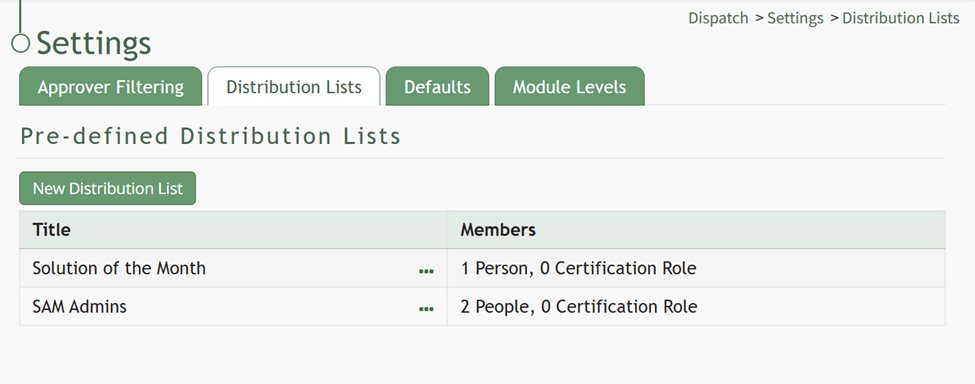
Selecting the three dot icon to the right of the distribution list title opens a context menu. Context menu options are explained on the table below.
Pre-Defined Distribution List Table Context Menu Option Explanations | |
Options | Explanation |
Edit List | Selecting Edit List from the context menu opens the Edit Distribution List How |
Delete List | Selecting Delete List from the context menu opens the Delete Distribution List Confirmation Modal which lists the title of the distribution list being deleted and asks, “Are you sure you want to delete this Distribution List?” How |
Clicking the New Distribution List button beneath the header opens the New Distribution List Modal which is used in the creation of new pre-defined distribution lists. WIKI LINK HOW TO CREATE NEW DISTRIBUTION LISTS
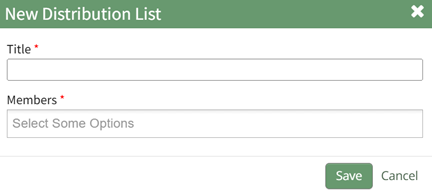
How To: Create a Pre-Defined Distribution List
{{@684}}