
Security Tab
The Security Tab displays the password requirements for the KAStrack system. The user manual refers to the default requirements established by the system, but these can be customized for your organization.
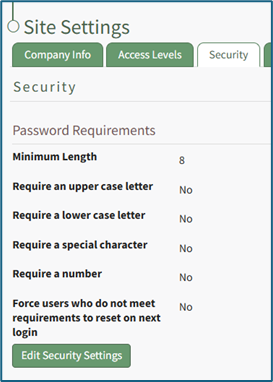
Default settings include a minimum password length of 8 characters. There are no requirements for usage of uppercase or lowercase letters, special characters, or numbers enabled by default. Users who do not meet requirements are not forced to reset their password on their next login. These options can be altered by editing the Security Settings in the Site Settings Module.
WIKI LINK HOW TO: EDIT PASSWORD REQUIREMENTS