People Module Summary
The People Module is where individual certifications can be managed. The term “certifications” pertains to the types of qualification/training/licenses/policies/credentials, etc. that can be tracked by KAStrack. The People Module also allows for creation of Companies and Certification Roles that can be designed to help organize users on the site into groups, e.g. organizing users based on their job title or department.
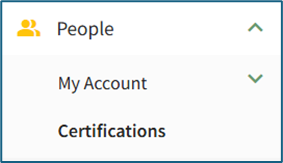
Individuals with Admin/Supervisor MainModule MenuLevels for Userthe MainPeople Menu
Module 
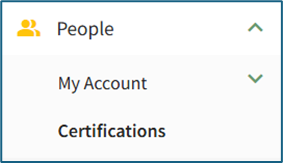
will
have access to pages that other module levels do not. Separate chapters have been created in BookStack so that users can view information about the People Account consistent with what their module level allows them to access.
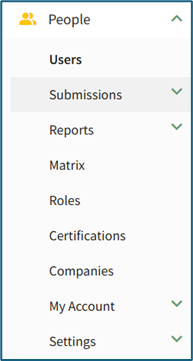
People Module Page Summary Table |
Page | Explanation |
Users WIKI LINK |
The Users Page in the People Module allows a user to review KAStrack user certifications in table form.
|
Submissions WIKI LINK |
The Submissions Page allows the user to manage certification submissions. The Submissions Page has three tabs that can be accessed from the Main Menu, the Pending Approvals Tab, Attachment Inbox Tab, and Batch Submit Certifications Tab.
|
Reports WIKI LINK |
The Reports Page permits the viewing/generation of various reports on certification status for users. The Reports Page has three tabs that can be accessed from the Main Menu, the Supervisor Report Tab, Shared Reports Tab, and Create Shared Report Tab.
|
Matrix WIKI LINK |
The Matrix Page allows quick visualization of all user certifications in a filterable grid format.
|
Roles
WIKI LINK |
The Roles Page allows creation and management of certification roles used to organize/group user accounts.
|
Certifications WIKI LINK |
The Certifications Page allows creation and management of certifications/qualifications/trainings.
|
Companies WIKI LINK |
The Companies Page allows creation and management of companies within KAStrack for streamlined user organization. Various companies can be added for, say, the same brand with different locations, branches, etc.
|
My Account WIKI LINK |
The My Account Page allows the user to view their individual user account’s certifications and take any necessary actions to maintain compliance. The My Accounts Page has three tabs that can be accessed from the Main Menu, the My Certifications Tab, Submit Certifications Tab, and Certification Roles Tab.
|
Settings WIKI LINK |
The Settings Page allows admins to establish parameters for KAStrack notifications, modify module levels, and adjust other module-specific settings. The Settings Page has two tabs that can be accessed from the Main Menu, the Module Settings Tab and Module Levels Tab.
|