
A Certification's Details Page
Each certification created in KAStrack will have its own Certification's Details Page. You can access the Certification Details Page by clicking the certification name in the Certifications Table on the Certifications Page of the People Module. A Certification Details Page is comprised of three tabs: Certification Info, Associated Roles, and Associated Users. Each tab is explained in detail on this page.
The Associated Roles Tab and Associated Users Tab are not visible to all users. Visibility is dependent on Module Level access permissions. WIKI
How HOWTo: TOCreate CREATEa NEWNew MODULEModule LEVELSLevel (PEOPLEPeople MODULE)Module)
{{@421}}
Certification Info Tab
The Certification Info Tab shows the details for a specific certification.
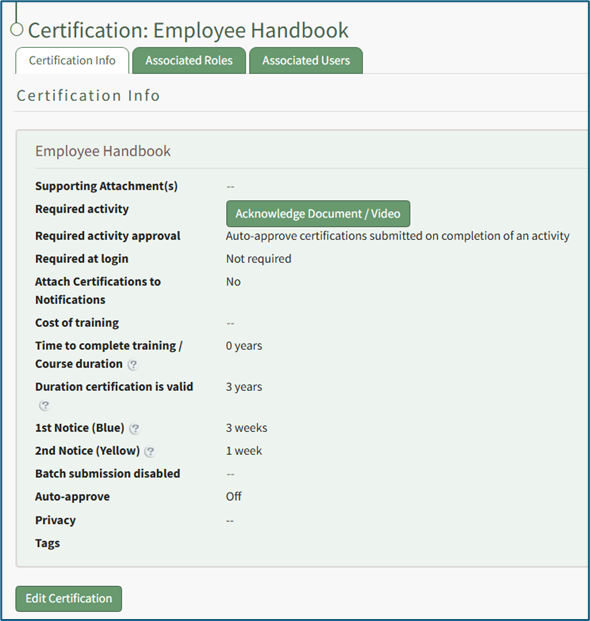
Users have an ability to complete the certification's required activity on the Certification Info Tab. Administrators can edit certification information from the Certification Info Tab. WIKI
How HOWTo: TOEdit EDITCertification A CERTIFICATION Details
{{@878}}
Associated Roles Tab
The Associated Roles Tab shows list of the certification roles that have been assigned this specific certification.
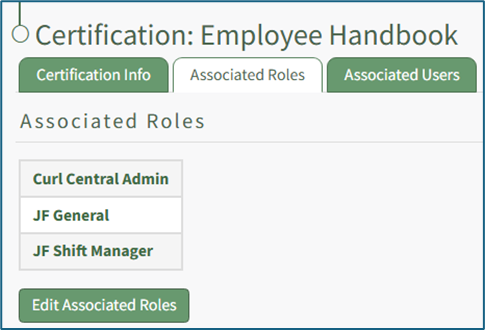
An account administrator can edit the associated certification roles directly from the Associated Roles Tab.
How To: Edit Certification Role Information
{{@429}}
Associated Users Tab
The Associated Users Tab displays the Associated Users Table, which shows a listing of all users who are currently required to complete this certification or who have previously completed it.
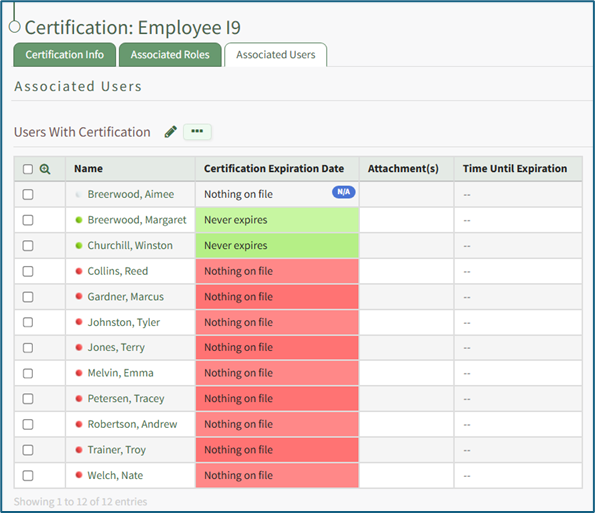
Both the pencil icon and the context menu on the Associated Users Tab allows an administrator to assign this certification as an "Other Required Certification" independent of any assigned certification role. WIKI
How HOWTo: TOAssign ASSIGNCertifications Ato CERTIFICATIONa INDEPENDENTUser OFIndependent Aof REQUIREDa CERTIFICATIONRequired ROLECertification Role
{{@873}}
Clicking the checkboxes to the left of the user's name opens an additional modal.
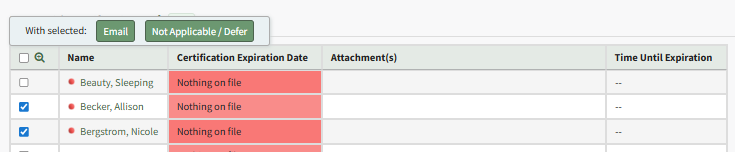
Selecting the Email button opens a modal that is used to send a certification email notification to the specified users. The modal offers the option to add a message to the email notification.
How To: Send a User an Email Notification Regarding a Certification
{{@833}}
Selecting the Not Applicable / Defer button opens the Defer Certification Modal. Certification can be required (not allowed to defer), designated as not applicable for the user, or deferred until a specified date/time.
How To: Indicate a Required Certification Cannot Be Deferred
WIKI{{@868}}
How HOWTo: TOIndicate INDICATEa ARequired REQUIREDCertification CERTIFICATIONis CANNOTNot BEApplicable DEFERREDto a Specified User
{{@869}}
How To: Defer a Certification for a Specified User
{{@867}}
WIKI LINK HOW TO INDICATE A REQUIRED CERTIFICATION IS NOT APPLICABLE TO A SPECIFIED USER(S)
WIKI LINK HOW TO DEFER A CERTIFICATION FOR A SPECIFIED USER