
A Certification Role's Details Page
Each certification role created in KAStrack will have its own Certification Role Details Page. It is comprised of three tabs: Assigned Users, Required Certifications, and Role Info. Each tab is explained in detail on this page.
Assigned Users Tab
The Assigned Users Tab shows all available users currently assigned to the Certification Role in the Assigned Users Table. This tab allows an administrator to edit the users assigned to a certification role and is the most efficient way to make bulk edits to multiple users’ role assignments at once.
This table functions just like the Matrix page, but displays a view filtered to this particular role. For more details on table functionality, refer to the Matrix Page in the User Manual.
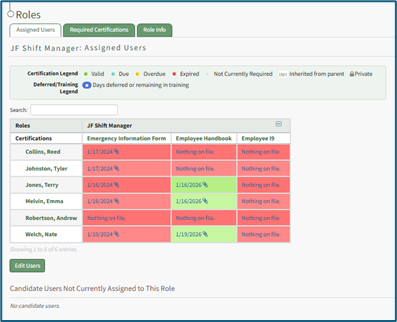
If there are no users assigned to the Certification Role yet, the page will display a message stating “No users are assigned to this role.”
The section below the Role Users Table displays “Candidate Users Not Currently Assigned to This Role”. This shows users who, based on their current completed Certifications and the Certification Requirements for this role, would be Valid (green) if they were to be added to this Certification Role.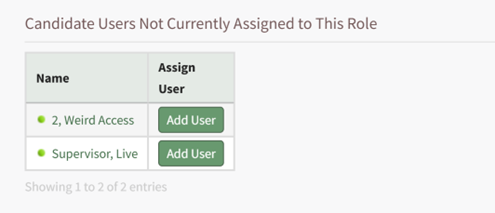
Use the Add User button from the Candidate Users table to simply add the user to the Certification Role.
Required Certifications Tab
The Required Certifications Tab lists the required certifications associated with the specific Certificaiton Role.
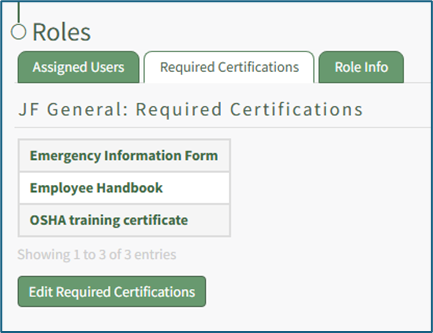
The Required Certifications Tab allows an administrator to edit the list of required certifications.
WIKI LINK HOW TO EDIT REQUIRED CERTIFICATIONS FOR A ROLE
Role Info Tab
The Role Info Tab states the description, role requirements and tags associated with a certification role, as well as competency settings for the Certification Role (if competency tracking is enabled for your KAStrack installation).
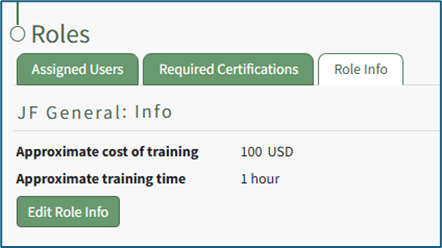
The Role Info Tab allows an administrator to edit this information.
WIKI LINK HOW TO EDIT ROLE INFO FROM A CERTIFICATION ROLE'S DETAILS PAGE
WIKI LINK HOW TO DELETE A CERTIFICATION ROLE FROM A CERTIFICATION ROLE'S DETAILS PAGE