
Edit a Budget Item After Submission for Approval
Go to the Active/Closed/Archived Budget Table and click the title of the budget you wish to edit, opening the Budget Item Per Budget Table.
If the budget item has already been submitted for approval, it must be unlocked first before edits can be made.
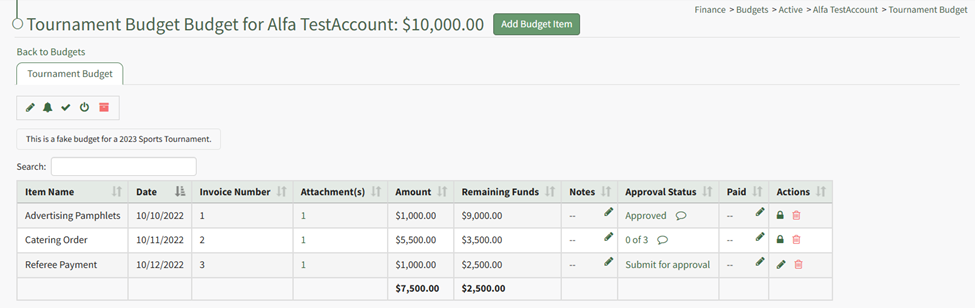
Unlock the approved budget item. WIKI
How HOWTo: TO:Unlock UNLOCKa ASubmitted SUBMITTEDBudget BUDGETItem ITEMfor FOR EDITSEditing
{{@314}}
The lock icon is now replaced with the pencil icon in the actions columncolumn, and the budget item is unlocked.

The pencil icon opens the Edit Budget Item Modal if clicked.
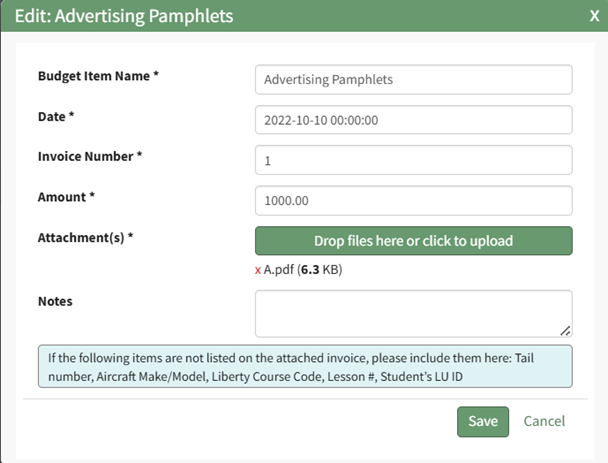
Make the necessary changes and select Save for your edits to be recorded.
You must resubmit your budget items for approval.
How To: Resubmit a Budget Item for Approval after Edits Are Made
WIKI{{@315}}