
Add Components to a Parent Asset
To add components to an asset, open the Manage Assets Page in the Assets Module from the Main Menu.
In order to create components, the parent asset must have already been created. WIKI LINK HOW TO CREATE A NEW ASSET
How To: Create a New Asset
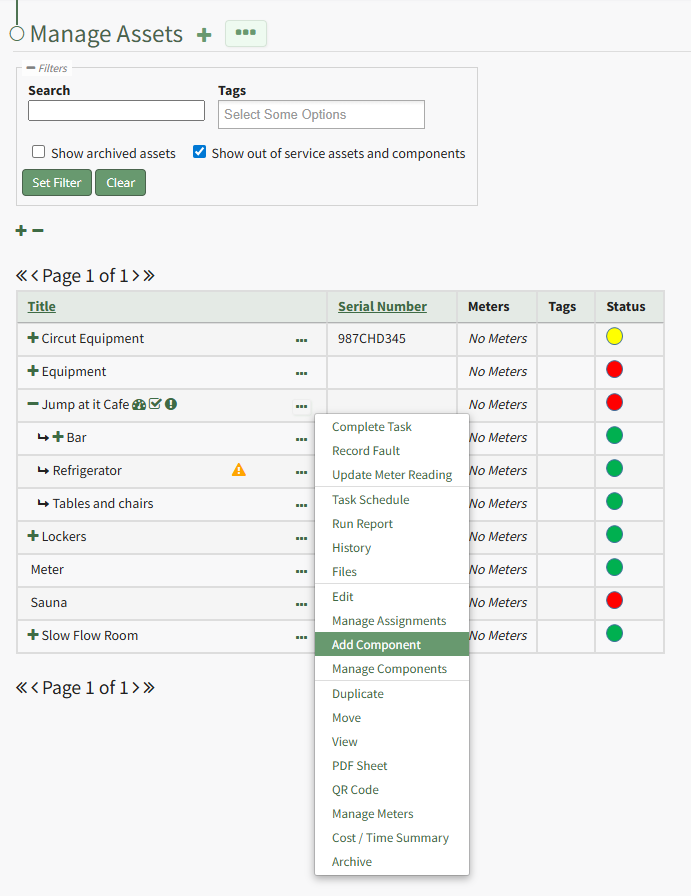
Identify the pre-existing asset (or component) that you would like to place this new component under, and click the three dot (…) icon to the right of the asset name in the Manage Assets table opening the Manage Asset Context Menu. Select "Add Component" opening the New Component Modal.
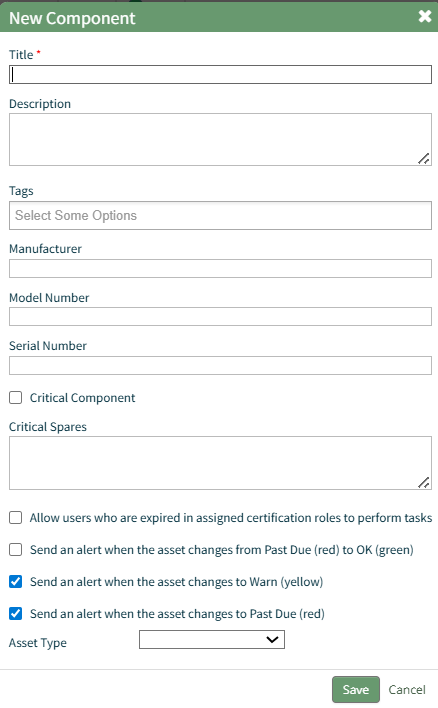
The fields on the New Component modal ask for the same information on the New Asset Modal. For a detailed description of the fields, refer to the How To Create a New Asset page. WIKI LINK HOW TO CREATE A NEW ASSET
Select the “Save” button and the component will appear underneath its asset in the Manage Asset table (if the view is expanded) where it can be managed. Subcomponents/additional child components can also be created for components if desired.
Select the three dot (…) menu to the right of the component you would like to add an additional subcomponent in the asset’s hierarchal structure.