
Database Groups Page
The Groups Page in the Database Module is utilized for organization function and allows databased to be grouped together for efficiency. There is a button that allows for the creation of new groups. The Groups Table on the Manage Groups Page lists all groups in alphabetical order.
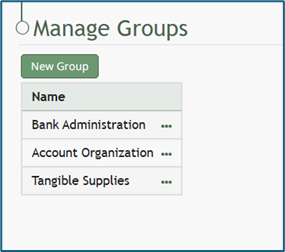
The three-dot icon to the right of a group name opens a context menu with options that are explained in the table below.
Database Groups Context Menu Option Explanations | |
Option | Explanation |
View Group | Selecting “View Group” from the context menu opens the View Group Modal, stating the name of the group. |
Edit Group | Selecting “Edit Group” from the context menu opens the Edit Group Modal. |
Delete Group | Selecting “Delete Group” from the context menu opens the Delete Group Confirmation Modal. |