
Module Summary Widget Explanation
Module Summary Widget Explanation Table |
|||
|
On a mobile device accessing the web version of KAStrack, additional options will show in the context menu, allowing the user to rearrange the ordering of the widgets within the widget grid. |
|||
Module |
Comments |
Image |
|
Actions |
Module Summary Widget Key |
|
|
|
|
Overdue |
||
|
|
Nearing due date |
||
|
|
Group(s) past inactivity date |
||
|
|
Outstanding with no due date |
||
|
|
Outstanding |
||
Assets |
Module Summary Widget Key |
|
|
|
|
Overdue critical item task |
||
|
|
Overdue task | ||


Module Summary Widget Key
Critical item task due soon
Task due soon
Deferred Task
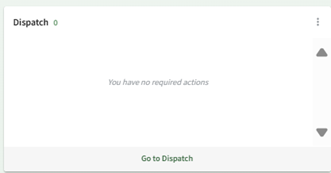
Dispatch
Module Summary Widget Key

To go to scheduled status
To go to ready to dispatch status
To go to dispatched status
To go to completed status
To go to cancelled status
To go to archived status
Documents
Module Summary Widget Key
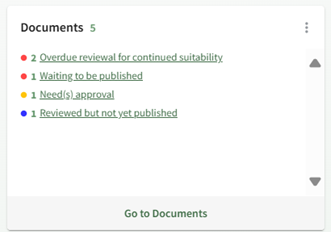

Overdue continued suitability review
Waiting to be publishedWaiting to be published

Need(Require(s) approvalacknowledgement
Require(s) acknowledgement
Reviewed but not yet approved
Notification(s) of new revisions
DraftDrafts Form Entries Assigned to Me
Forms can be designed to allow users to save their current work as a draft, giving them the option to come back to an entry and complete it at a later time. If a user has any active Draft Entries assigned to their account, they can be accessed through a quick link in the Draft Form Entries Assigned to Me Module Summary.

Module Summary Widget Key

Finance


Outstanding Budget Items

Pending Approvals
Forms
Module Summary Widget Key
Approval past due
Approval required
Drafts
Note: At the bottom of the Forms Module Summary Widget, forms attached to the dashboard are shown as quick links for ease of access. This is set in the Form’s settings by its creator or an Admin.
WIKIILINKWIKI ILINK HOW TO: ADD FORMS TO THE FORMS MODULE SUMMARY
Kanban
All To Do Notifications in Kanban

Kanban Module Summary

Customizable Kanban Board Module Summary
The Kanban Module Summary cannot be customized. Each board will show with the total number of to dos associated with it.
Each Kanban Board can have their own individual Module Summary, which can be customized at the Kanban level. Changes to the Board Module Summary will show to all who add the widget.
WIKI LINK HOW TO CUSTOMIZE AN INDIVIDUAL BOARD MODULE SUMMARY
MeetingsMeeting with Recent Instance

Module Summary Widget Key
Meetings
Meeting with Recent Instance


Module Summary Widget Key

Meeting


Module Summary Widget Key

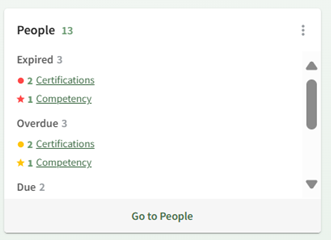
People
Module Summary Widget Key

Expired Certification

Expired Competency

Overdue Certification
Overdue Competency
Due Certification
In Training or Deferred Certification
In Training or Deferred Competency
People - Competency
Module Summary Widget Key
Expired Competency
Overdue Competency
In Training or Deferred Competency
People – Courses
Module Summary Widget Key
Expired Course
Overdue Course
Due Course
Deferred Course