
Settings Page: Module Levels
“Settings” within the Courses Module directs the user to “Module Levels” page where module level permissions for the Courses Module can be customized.
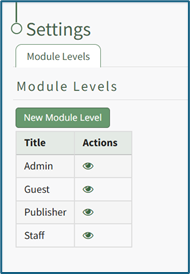
There are four base Module Levels with default permissions in KAStrack that cannot be altered by the user. An explanation of the permissions associated with each module level are shown in the Courses Module Level Permissions Table below.
Courses Module - Module Level Permissions Table | |
Module Level | Permissions |
Admin | Can manage rolls, add/edit/delete courses, see the stats page, view all course stats, manual reset course, test course, can take course on behalf of anyone |
Guest | None |
Manager | add/edit/delete courses, stats, manual reset course, test course |
Staff | None |
New Module Levels can be created in order to customize module level permissions.
WIKI
How LINK:To: HOW TO CREATECreate A NEWNew MODULEModule LEVELLevel (COURSESCourses MODULE)
{{@238}}
Module Level Customization Icons | |
Icon | Explanation |
| The eyeball icon allows you to view users assigned to the module level as well as the permissions assigned to them. |
| The bulleted list icon allows you to assign permissions to customized module levels. |
| The pencil icon opens the Edit Module Level Modal. |
| The trashcan icon opens the Delete Module Level Confirmation Modal. |


