
Home Page: Manage Courses Page
The Courses Module homepage is the Manage Courses Page and is only visible to users with course-management permissions. System users do not have access to this module.

KAStrack uses Certifications within the People Module to assign a course to users. Before a certification with a required activity is set up, a user will not be able to take a course.
How To: Set Up a Course as a Certification
{{@237}}
Courses are taken as part of a certification. To setup a certification with a course as a required activity, you must create a Certification in the People module with Required Activity set to "Course - KAStrack".
The Manage Courses page displays a New Course button beneath the page header.
How To: Create a New Course
{{@233}}
Course Context Menu Item Explanations
The three dot icon to the right of a course title opens the Course Context Menu with links for quick actions. An explanation of each is included below.
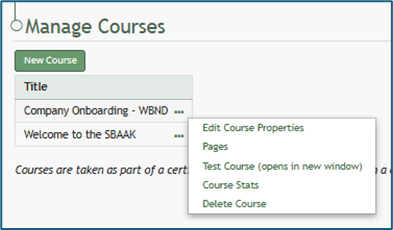
Course Context Menu Option Explanations | |
Options | Explanation |
Edit Course Properties | “Edit Course Properties” opens the “Edit Course” popup screen for editing, allowing the user to edit the original parameters that were selected when the course was created, re-opening the modal to change the course name, tags, settings for grading, and post course review. How To: Edit Course Page Properties{{@239}} |
Pages | “Pages” opens the individual pages that have been created for the course. How To: Edit Existing Pages{{@234}} How To: Add Pages in a New / Existing Course{{@244}} |
Test Course | “Test Course” opens a trial run of the course with quiz questions. Testing the course will not impact course stats. How To: Take a Course in Test Mode{{@241}} |
Course Stats | “Course Stats” opens a page entitled “Stats for (title of course)” which displays records of test taking attempts and access to an individual’s selected answers. How To: Access Course Stats{{@242}} |
Delete Course | “Delete Course” will eliminate the course. When deleting a course, a warning will notify the user that deletion will “remove all pages and history of people taking the course.” Confirmation that deletion is desired is required. If the course is a required activity for a certification, it will not be deleted unless certification course requirement is removed from the certificate. How To: Delete a Course{{@243}} |