
Settings Page: Module Levels Tab
The Module Levels Tab on the Settings Page can be accessed from the Main Menu. The system default module levels for the module are visible in the Module Levels Table. New module levels with customizable permissions can be created and managed on this tab.
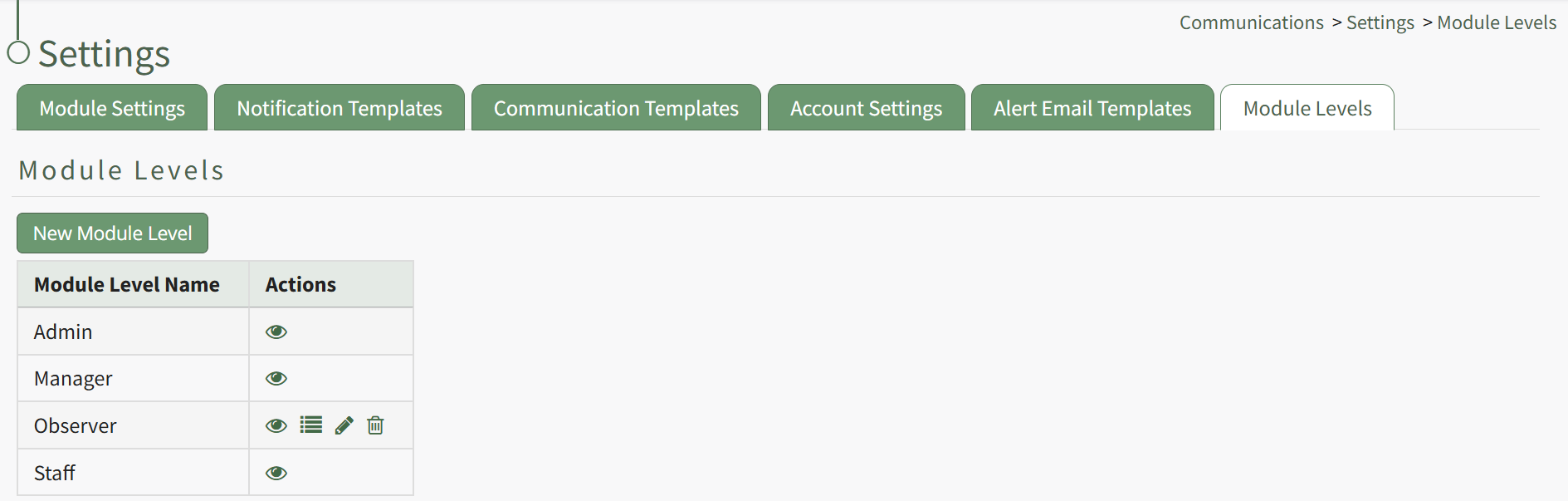
There are three system default module levels associated with the Communications Module. An explanation of the permissions associated with thateach default module level are shown in the Communications Module Level Permissions Table below.
System default module levels cannot be altered by the user:customized.
| |
Module Level | Permissions |
Admin | send communication, advanced send comm options, edit supervised users settings, manage notification templates (new/edit/delete), edit any users settings, edit new user settings, switch on off, manage roles (view roles, add role, unassign role, role permissions, assign hidden roles, edit role, delete role, assign roles), manage email config (view, edit, delete,and revert emailconfig), setup cc email, manage communication templates (view, edit, delete communication templates) |
Manager | edit supervised users settings, view email config, send communication |
Staff | N/A |
CustomizedNew Module Levels can be created.created in order to customize module level permissions. An explanation of the icons associated with customized module levels have been provided in the table below.
Module Level Customization Icons | |
Icon | Explanation |
| The eyeball icon allows you to view users assigned to the module level as well as the permissions assigned to them. |
| The bulleted list icon allows you to assign permissions to customized module levels. |
| The pencil icon opens the Edit Module Level Modal. |
| The trashcan icon opens the Delete Module Level Confirmation Modal. |


How To: Create a New Module Level (Communications Module)
{{@108}}
A complete list of all permissions associated with the Communications Module have been provided below.
