
Assets Settings Page: Module Level Tab
The Module levels tab shows the different module levels for the Assets Module and the default permissions that granted to each module level. The eye widget under the “Actions” column opens a modal that allows the user to view the permissions granted to the users with that role.
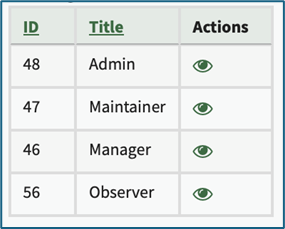
There are four base Module Levels with default permissions in the Assets Module that cannot be altered by the user. The permissions associated with each are explained in the table below.
Assets Module Default Module Level Permissions Table | |
Module Level | Permissions |
Admin | clean manufacturers, manage all assets, edit/delete/download files, log file uploads/faults/maintenance/modifications, log/view assets, pull reports, delete/modify log entries, add/delete/edit/assign/maintenance assets, add/delete meters and meter readings, view/edit/delete maintenance templates, maintenance comments, bulk editing permission |
Maintainer | upload files, log fault, log maintenance, add meter data, view/log assets |
Manager | delete/edit library files, delete/download files, upload files, log faults, log maintenance, add meter data, log/view assets, view reports, add maintenance comments, add/delete/edit/assign/copy assets, add/delete meters, edit/delete meter components, bulk editing permission |
Observer | Download files, view/log assets, view reports |
Customized Module Levels can be created. WIKI
How HOWTo: TO:Create CREATEa NEWNew MODULEModule LEVELSLevel (ASSETSAssets MODULE)Module)
{{@476}}