
Assets Settings Page: Manufacturers Tab
The Manufacturers Tab on the Settings Page of the Assets Module allows the user to add new manufacturers, search through existing manufacturers and manage them from this page.
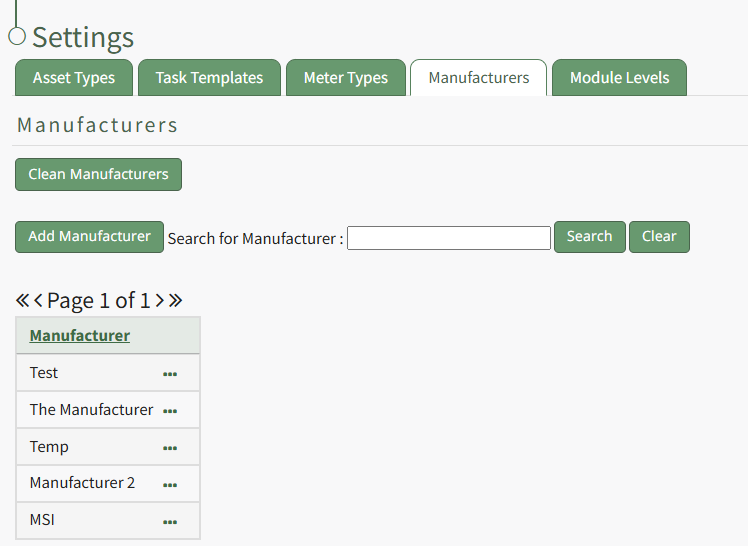
Selecting the green “Add Manufacturer” button will open a modal that will allow the user to add a new manufacturer who will be added to the table on the Manufacturer tab. WIKI LINK HOW TO ADD A NEW MANUFACTRURER
The “Clean Manufacturers” allows the user to remove any manufacturers with no name associated and to merge any duplicate manufacturers listed.
KAStrack is programmed to require a backup of data prior to cleaning the manufacturers, so if this button is selected and a backup has not yet been completed, a prompt will appear to remind the user to first save the data and then return to this page.
Selecting the three dot (…) icon located to the right of the manufacturers listed within this table will permit the following options: View, Edit, or Delete.
Manufacturers Type Context Menu Option Explanations Table | |
Option | Explanation |
View | Selecting "View" from the context menu will open the View Meter Type Modal which lists all key information regarding the specified meter type.
WIKI LINK HOW TO |
Edit | Selecting “Edit” from the context menu will open the Edit Meter Type Modal where the meter fields can be altered. WIKI LINK HOW TO: |
Delete | Selecting Delete from the Meter Type Context menu will open a deletion confirmation modal that states, "Please confirm you wish to delete this meter type." WIKI LINK HOW TO |