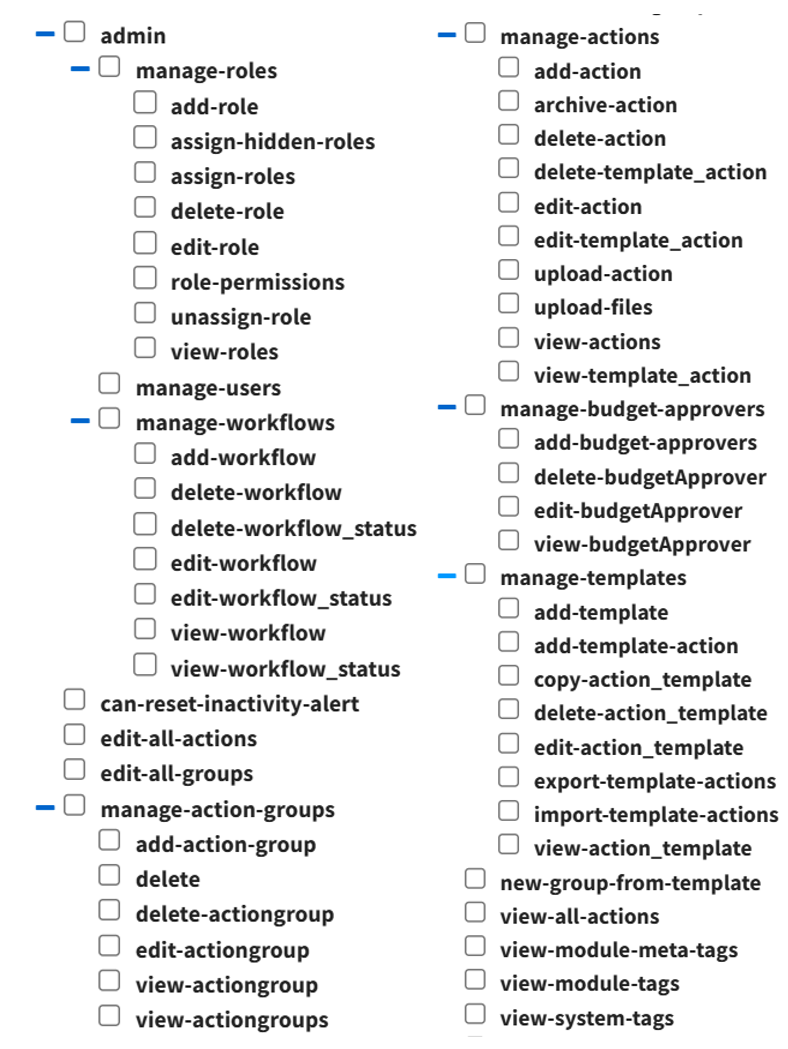
Actions Settings Page: Module Levels Tab
The Module Level Tab shows the different module levels for the Actions Module, allowing for the ability to see the permissions granted for different levels of user responsibility. The eye icon under the Actions column opens a modal that allows for the viewing of the permissions granted to users by Module Level.
There are four base Module Levels given default permissions in the Actions Module that cannot be altered.
Actions Module - Module Level Permissions | |
Module Level | Permissions |
Admin | Can reset inactivity alert, manage budget approvers (add, view, edit and delete), manage templates (add template, view/edit/copy/delete action templates, add/import/export template actions), manage workflows (add/ view/edit/delete workflow, view/edit/delete workflow status), manage roles (assign/unassign/add/view/edit/delete roles, assign hidden roles, role permissions), manage actions (upload/ view/archive/edit/delete/add actions, view/edit/delete template actions, upload files), manage action groups (delete/edit/view/add action groups), edit all groups, edit all actions, view all actions, new groups from template |
Guest | Manage actions (view/archive/edit/delete/add actions, view/edit/delete template actions, upload files), manage action groups (view and add action groups) |
Manager | Can reset inactivity alert, manage templates (view/edit/copy/delete action templates, add/import/export template actions), edit all actions, new groups from template, manage actions (upload/view/archive/edit/delete/ add actions, view/edit/delete template actions, upload files), manage action groups (delete/edit/view/add action groups) |
Staff | Manage actions (view/archive/edit/delete/add actions, view/edit/delete template actions, upload files), manage action groups (edit/view/add action groups) |
A manually created Module Level has four quick link icons for quick action available.
Module Level Customization Icons | |
Icon | Explanation |
| The eyeball icon allows you to view users assigned to the module level as well as the permissions assigned to them. |
| The bulleted list icon allows you to assign permissions to customized module levels. |
| The pencil icon opens the Edit Module Level Modal. |
| The trashcan icon opens the Delete Module Level Confirmation Modal. |


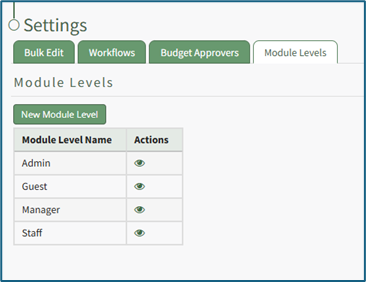
A comprehensive list of possible permissions in the Actions Module is shown below.