
Actions Groups Page
Action Groups can be defined as the overarching goal/event/task that is brought to fruition through the completion of the associated actions. Each action must be associated with a specific action group. Action Groups organize actions and defines like settings between its associated tasks.
Selecting Groups from the Main Menu will open the Manage Action Groups Page that houses the Action Group Table. New Action Groups can be created, edited, and managed on this page.
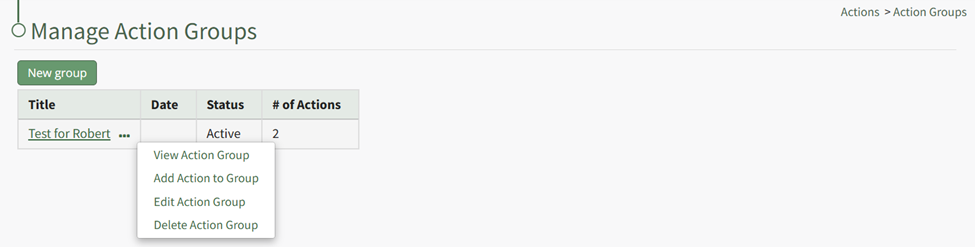
To create a new action group, select the green “New group” button located underneath the page header. A “New Action Group” dialogue box will appear. WIKI KINK HOW TO: CREATE A NEW ACTIONS GROUP
The Action Groups Table will display any created Action Groups organized alphabetically according to title, showing the date, group status, and number of actions associated with the group.
Note: The action group date is flexible in its purpose. When Action Groups have the same title, the date can be used to distinguish between the action group it is referring to. How your organization chooses to use it can vary based on your needs.
Selecting the three-dot icon to the right of the action group title will open the Action Group Context Menu. An explanation of the context menu options are included in the table below.
Action Group Context Menu Option Explanation Table | |
Option | Explanation |
View Action Group | Selecting "View Action Group" opens the View Action Group Modal which displays the action group status, days for default warning, Action Group title and tags, description, days for inactivity alert, and who to send the inactivity alert to. |
Add Action to Group | Selecting "Add Action to Group" opens the New Action Modal, allowing for the creation of new actions within the action group. |
Edit Action Group | Selecting "Edit Action Group" opens the Edit Action Group Modal that allows for changes to the parameters set for that specific action group. |
Delete Action Group | Selecting "Delete Action Group" will open the deletion confirmation modal which states the title of the action group you are confirming will be deleted. |