# Company Info Tab
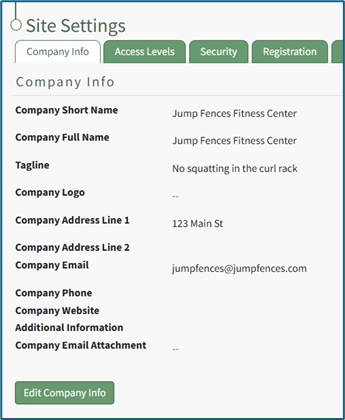
The Company Info Tab displays your organization’s company information. This information is independent of the Companies created on the Companies Page of the People Module.
[](https://kaswiki.kastrack.com/uploads/images/gallery/2025-11/Yr9image.png)
Inputs include: Company Short Name, Company Full Name, Tagline, Company Logo, Company Address, Company Email, Company Phone, Company Website, Additional Information, Company Email Attachment.
Input a Company Short Name that will be visible in the center of the top bar of the site, in sent emails and for column headers.
Changes to the Company Short Name may not be reflected in sent emails for up to 24 hours.
The Company Full Name and Company Tagline are shown on the registration and login pages.
The Company Logo will show in the footer on all pages throughout the KAStrack system.
Although the upload limit for a file is 524 MB, it is highly encouraged to use an image that is optimized for web viewing (e.g. less than 500k which minimizes loading times). We recommend using a logo with a height of 100 pixels or less for a proportionally sized footer.
The Company Email Attachment can optionally be included when sending Shared Reports in the People Module.
How To: Edit Company Info
{{@93}}