# Edit a Speed Dial

To edit an existing Speed Dial, go to the Dashboard Module and select the dashboard you wish to make speed dial edits on.

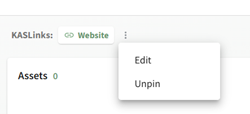
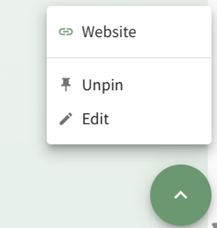
The most efficient way to edit a speed dial is from its current placement. Refer to the table below to identify how to access the “Edit” option from each of the various speed dial placements.

<table border="1" cellpadding="0" cellspacing="0" class="MsoTableGrid" id="bkmrk-how-to-select-edit-b" style="border-collapse: collapse; mso-table-layout-alt: fixed; border: none; mso-border-alt: solid windowtext .5pt; mso-yfti-tbllook: 1184; mso-padding-alt: 0in 5.4pt 0in 5.4pt;"><tbody><tr style="mso-yfti-irow: 0; mso-yfti-firstrow: yes;"><td colspan="4" style="width: 467.5pt; border: solid windowtext 1.0pt; mso-border-alt: solid windowtext .5pt; padding: 0in 5.4pt 0in 5.4pt;" valign="top" width="623">**<span style="mso-fareast-font-family: 'Times New Roman'; mso-fareast-theme-font: minor-fareast; mso-font-kerning: 0pt; mso-ligatures: none;">How to Select Edit Based on Speed Dial Placement</span>**

</td></tr><tr style="mso-yfti-irow: 1;"><td style="width: 67.25pt; border: solid windowtext 1.0pt; border-top: none; mso-border-top-alt: solid windowtext .5pt; mso-border-alt: solid windowtext .5pt; padding: 0in 5.4pt 0in 5.4pt;" valign="top" width="90">**<span style="mso-fareast-font-family: 'Times New Roman'; mso-fareast-theme-font: minor-fareast; mso-font-kerning: 0pt; mso-ligatures: none;">Placement</span>**

</td><td style="width: 1.75in; border-top: none; border-left: none; border-bottom: solid windowtext 1.0pt; border-right: solid windowtext 1.0pt; mso-border-top-alt: solid windowtext .5pt; mso-border-left-alt: solid windowtext .5pt; mso-border-alt: solid windowtext .5pt; padding: 0in 5.4pt 0in 5.4pt;" valign="top" width="168"><span style="mso-fareast-font-family: 'Times New Roman'; mso-fareast-theme-font: minor-fareast; mso-font-kerning: 0pt; mso-ligatures: none;">Top</span>

</td><td style="width: 113.85pt; border-top: none; border-left: none; border-bottom: solid windowtext 1.0pt; border-right: solid windowtext 1.0pt; mso-border-top-alt: solid windowtext .5pt; mso-border-left-alt: solid windowtext .5pt; mso-border-alt: solid windowtext .5pt; padding: 0in 5.4pt 0in 5.4pt;" valign="top" width="152"><span style="mso-fareast-font-family: 'Times New Roman'; mso-fareast-theme-font: minor-fareast; mso-font-kerning: 0pt; mso-ligatures: none;">Floating</span>

</td><td style="width: 160.4pt; border-top: none; border-left: none; border-bottom: solid windowtext 1.0pt; border-right: solid windowtext 1.0pt; mso-border-top-alt: solid windowtext .5pt; mso-border-left-alt: solid windowtext .5pt; mso-border-alt: solid windowtext .5pt; padding: 0in 5.4pt 0in 5.4pt;" valign="top" width="214"><span style="mso-fareast-font-family: 'Times New Roman'; mso-fareast-theme-font: minor-fareast; mso-font-kerning: 0pt; mso-ligatures: none;">Widget</span>

</td></tr><tr style="mso-yfti-irow: 2;"><td style="width: 67.25pt; border: solid windowtext 1.0pt; border-top: none; mso-border-top-alt: solid windowtext .5pt; mso-border-alt: solid windowtext .5pt; padding: 0in 5.4pt 0in 5.4pt;" valign="top" width="90">**<span style="mso-fareast-font-family: 'Times New Roman'; mso-fareast-theme-font: minor-fareast; mso-font-kerning: 0pt; mso-ligatures: none;">Image</span>**

</td><td class="align-center" style="width: 1.75in; border-top: none; border-left: none; border-bottom: solid windowtext 1.0pt; border-right: solid windowtext 1.0pt; mso-border-top-alt: solid windowtext .5pt; mso-border-left-alt: solid windowtext .5pt; mso-border-alt: solid windowtext .5pt; padding: 0in 5.4pt 0in 5.4pt;" valign="top" width="168"><span style="mso-fareast-font-family: 'Times New Roman'; mso-fareast-theme-font: minor-fareast; mso-font-kerning: 0pt; mso-ligatures: none;"> </span>

<span style="mso-fareast-font-family: 'Times New Roman'; mso-fareast-theme-font: minor-fareast; mso-font-kerning: 0pt; mso-ligatures: none;"> </span>

[![image.png](https://kaswiki.kastrack.com/uploads/images/gallery/2025-11/scaled-1680-/vSsimage.png)](https://kaswiki.kastrack.com/uploads/images/gallery/2025-11/vSsimage.png)

<span style="mso-fareast-font-family: 'Times New Roman'; mso-fareast-theme-font: minor-fareast; mso-font-kerning: 0pt; mso-ligatures: none; mso-no-proof: yes;"> </span>

</td><td class="align-center" style="width: 113.85pt; border-top: none; border-left: none; border-bottom: solid windowtext 1.0pt; border-right: solid windowtext 1.0pt; mso-border-top-alt: solid windowtext .5pt; mso-border-left-alt: solid windowtext .5pt; mso-border-alt: solid windowtext .5pt; padding: 0in 5.4pt 0in 5.4pt;" valign="top" width="152">[![image.png](https://kaswiki.kastrack.com/uploads/images/gallery/2025-11/scaled-1680-/0xNimage.png)](https://kaswiki.kastrack.com/uploads/images/gallery/2025-11/0xNimage.png)

<span style="mso-fareast-font-family: 'Times New Roman'; mso-fareast-theme-font: minor-fareast; mso-font-kerning: 0pt; mso-ligatures: none; mso-no-proof: yes;"> </span>

</td><td class="align-center" style="width: 160.4pt; border-top: none; border-left: none; border-bottom: solid windowtext 1.0pt; border-right: solid windowtext 1.0pt; mso-border-top-alt: solid windowtext .5pt; mso-border-left-alt: solid windowtext .5pt; mso-border-alt: solid windowtext .5pt; padding: 0in 5.4pt 0in 5.4pt;" valign="top" width="214"><span style="mso-fareast-font-family: 'Times New Roman'; mso-fareast-theme-font: minor-fareast; mso-font-kerning: 0pt; mso-ligatures: none;"> </span>

<span style="mso-fareast-font-family: 'Times New Roman'; mso-fareast-theme-font: minor-fareast; mso-font-kerning: 0pt; mso-ligatures: none;"> </span>

[![image.png](https://kaswiki.kastrack.com/uploads/images/gallery/2025-11/scaled-1680-/Su7image.png)](https://kaswiki.kastrack.com/uploads/images/gallery/2025-11/Su7image.png)

<span style="mso-fareast-font-family: 'Times New Roman'; mso-fareast-theme-font: minor-fareast; mso-font-kerning: 0pt; mso-ligatures: none; mso-no-proof: yes;"> </span>

</td></tr><tr style="mso-yfti-irow: 3; mso-yfti-lastrow: yes;"><td class="align-center" style="width: 67.25pt; border: solid windowtext 1.0pt; border-top: none; mso-border-top-alt: solid windowtext .5pt; mso-border-alt: solid windowtext .5pt; padding: 0in 5.4pt 0in 5.4pt;" valign="top" width="90">**<span style="mso-fareast-font-family: 'Times New Roman'; mso-fareast-theme-font: minor-fareast; mso-font-kerning: 0pt; mso-ligatures: none;">Notes</span>**

</td><td class="align-center" style="width: 1.75in; border-top: none; border-left: none; border-bottom: solid windowtext 1.0pt; border-right: solid windowtext 1.0pt; mso-border-top-alt: solid windowtext .5pt; mso-border-left-alt: solid windowtext .5pt; mso-border-alt: solid windowtext .5pt; padding: 0in 5.4pt 0in 5.4pt;" valign="top" width="168"><span style="mso-fareast-font-family: 'Times New Roman'; mso-fareast-theme-font: minor-fareast; mso-font-kerning: 0pt; mso-ligatures: none;">Selecting the vertical three dot icon opens the context menu with the “Edit” option.</span>

</td><td class="align-center" style="width: 113.85pt; border-top: none; border-left: none; border-bottom: solid windowtext 1.0pt; border-right: solid windowtext 1.0pt; mso-border-top-alt: solid windowtext .5pt; mso-border-left-alt: solid windowtext .5pt; mso-border-alt: solid windowtext .5pt; padding: 0in 5.4pt 0in 5.4pt;" valign="top" width="152"><span style="mso-fareast-font-family: 'Times New Roman'; mso-fareast-theme-font: minor-fareast; mso-font-kerning: 0pt; mso-ligatures: none;">Click the floating speed dial icon to open it, showing the “Edit” option.</span>

</td><td style="width: 160.4pt; border-top: none; border-left: none; border-bottom: solid windowtext 1.0pt; border-right: solid windowtext 1.0pt; mso-border-top-alt: solid windowtext .5pt; mso-border-left-alt: solid windowtext .5pt; mso-border-alt: solid windowtext .5pt; padding: 0in 5.4pt 0in 5.4pt;" valign="top" width="214"><span style="mso-fareast-font-family: 'Times New Roman'; mso-fareast-theme-font: minor-fareast; mso-font-kerning: 0pt; mso-ligatures: none;">Selecting the vertical three dot icon opens the context menu with the “Edit” option.</span>

</td></tr></tbody></table>

Click the “Edit” button for the speed dial you wish to alter, opening the Edit Speed Dial Modal.

[![image.png](https://kaswiki.kastrack.com/uploads/images/gallery/2025-11/scaled-1680-/mzCimage.png)](https://kaswiki.kastrack.com/uploads/images/gallery/2025-11/mzCimage.png)

<span style="mso-no-proof: yes;"> </span>

Make the desired changes and select “Confirm” to save them. Your edits will now be reflected on the dashboard.

You can also select the “+ Add Widget” button from the top right-hand corner of any dashboard and click the speed dial icon.

[![image.png](https://kaswiki.kastrack.com/uploads/images/gallery/2025-11/scaled-1680-/YaXimage.png)](https://kaswiki.kastrack.com/uploads/images/gallery/2025-11/YaXimage.png)

<span style="mso-no-proof: yes;"> </span>

This opens the Add speed dial modal.

[![image.png](https://kaswiki.kastrack.com/uploads/images/gallery/2025-11/scaled-1680-/qJiimage.png)](https://kaswiki.kastrack.com/uploads/images/gallery/2025-11/qJiimage.png)

<span style="mso-no-proof: yes;"> </span>

Select the “Manage Speed Dials” button opening the Manage Speed Dial Modal.

[![image.png](https://kaswiki.kastrack.com/uploads/images/gallery/2025-11/scaled-1680-/34himage.png)](https://kaswiki.kastrack.com/uploads/images/gallery/2025-11/34himage.png)

<span style="mso-no-proof: yes;"> </span>

Click the “Edit” button for the speed dial you wish to alter, opening the Edit Speed Dial Modal.

[![image.png](https://kaswiki.kastrack.com/uploads/images/gallery/2025-11/scaled-1680-/T0Simage.png)](https://kaswiki.kastrack.com/uploads/images/gallery/2025-11/T0Simage.png)

<span style="mso-no-proof: yes;"> </span>

Make the desired changed and select “Confirm”.