Only customized access levels can be edited or deleted. The KAStrack generated default Access Levels (admin, supervisor, employee, and observer) cannot be edited or deleted.
[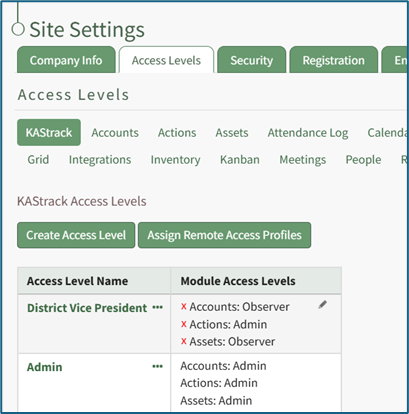](https://kaswiki.kastrack.com/uploads/images/gallery/2025-11/nI7image.png) The three dot (…) icon next to the customized access level opens a context menu with three options: View Access Level, Edit Access Level, and Edit Module Access. [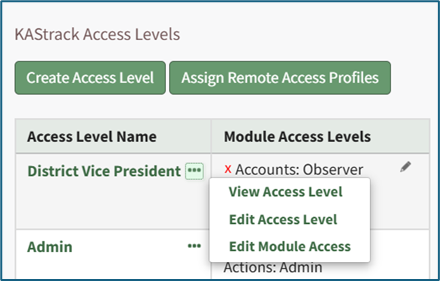](https://kaswiki.kastrack.com/uploads/images/gallery/2025-11/wvoimage.png) Selecting “Edit Access Level” from the context menu opens the Edit Access Level Page where the pencil icon can be used to add module levels and the X icon can be used to delete module levels. [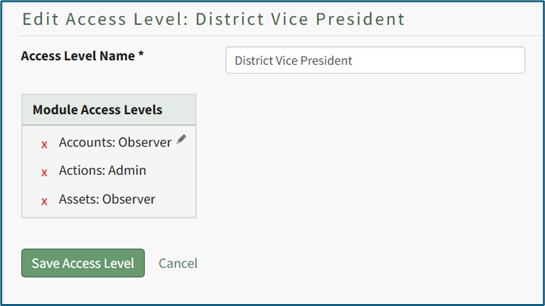](https://kaswiki.kastrack.com/uploads/images/gallery/2025-11/aH9image.png) Selecting “Edit Module Access” from the context menu opens the (Access Level): Edit Module Access Modal. [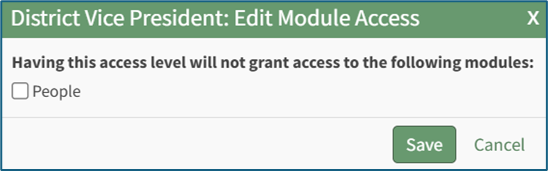](https://kaswiki.kastrack.com/uploads/images/gallery/2025-11/WKdimage.png) Selecting a module’s checkbox will prohibit a user with this access level from accessing the specified module.