# Delete an External Link within Integrations

To delete an external link, go to the Setup Page under External Links in the Integration Module. Click the three-dot icon to the right of the external link title opening the external link context menu.

[![image.png](https://kaswiki.kastrack.com/uploads/images/gallery/2025-12/scaled-1680-/crpimage.png)](https://kaswiki.kastrack.com/uploads/images/gallery/2025-12/crpimage.png)

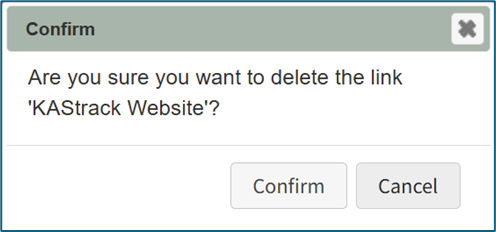
<span style="white-space: pre-wrap;">Select the option to “Delete Link” opening the Deletion Confirmation Modal which states, “Are you sure you want to delete the link ‘LinkName’? </span>

<p class="callout info">Deleting an external link will remove it from everyone who was granted visibility privileges.</p>

[![image.png](https://kaswiki.kastrack.com/uploads/images/gallery/2025-12/scaled-1680-/kC2image.png)](https://kaswiki.kastrack.com/uploads/images/gallery/2025-12/kC2image.png)

Select the “Confirm” button and a confirmation modal stating, “The link was deleted” will briefly show.

[![image.png](https://kaswiki.kastrack.com/uploads/images/gallery/2025-12/scaled-1680-/8kdimage.png)](https://kaswiki.kastrack.com/uploads/images/gallery/2025-12/8kdimage.png)

You will return to the External Links Setup Page, and the deleted external link will no longer show on the External Links Table.