# Create a New Calendar Event

To create a new calendar event, open the Home Page of the Calendar Module.

[![image.png](https://kaswiki.kastrack.com/uploads/images/gallery/2025-11/scaled-1680-/eABimage.png)](https://kaswiki.kastrack.com/uploads/images/gallery/2025-11/eABimage.png)

Select the “New Event” button on the left-hand side above the mini-monthly calendar view.

[![image.png](https://kaswiki.kastrack.com/uploads/images/gallery/2025-11/scaled-1680-/xa9image.png)](https://kaswiki.kastrack.com/uploads/images/gallery/2025-11/xa9image.png)

This opens the New Event Modal.

[![image.png](https://kaswiki.kastrack.com/uploads/images/gallery/2025-11/scaled-1680-/RsXimage.png)](https://kaswiki.kastrack.com/uploads/images/gallery/2025-11/RsXimage.png)

Input the title of the new event.

Select whether the new event is an event or meeting.

<p class="callout info">The selected value will be indicated by green text and a lightly filled background.</p>

Select the calendar icon in the date field, opening a calendar modal. Select the date of the meeting/event.

[![image.png](https://kaswiki.kastrack.com/uploads/images/gallery/2025-11/scaled-1680-/u7Cimage.png)](https://kaswiki.kastrack.com/uploads/images/gallery/2025-11/u7Cimage.png)
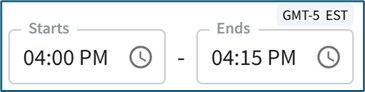
<span style="white-space: pre-wrap;">Input a start and end time. </span>

<p class="callout info">The time zone is indicated above the end time.</p>

Select the checkbox if the meeting / event takes place all day.

[![image.png](https://kaswiki.kastrack.com/uploads/images/gallery/2025-11/scaled-1680-/yf6image.png)](https://kaswiki.kastrack.com/uploads/images/gallery/2025-11/yf6image.png)
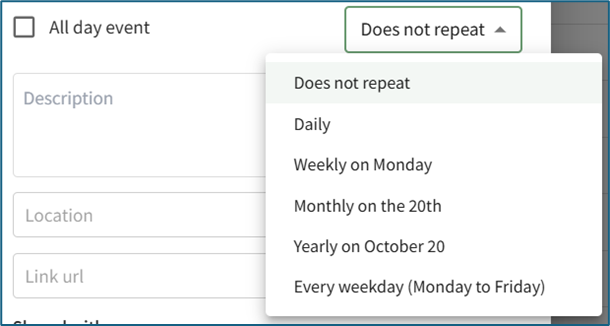
Use the dropdown menu to indicate if the meeting/event does not repeat, repeats daily / weekly / monthly / yearly, or every weekday.

Input a meeting / event description, location, and include a URL Link if relevant.

The meeting / event can be shared by selecting an individual, an access level, or a certification role. Users selected here will then be able to see the meeting / event on their Calendar,

Select the “Create Event” button, and the event will now show on the calendar.