# Add Different Question Types
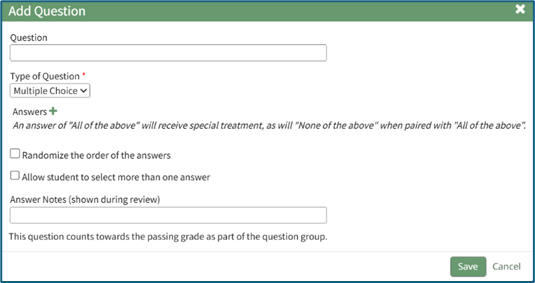
The “Add Question” popup allows a course creator to select from three question types:
True/False, Multiple Choice, or Free Text.
[](https://kaswiki.kastrack.com/uploads/images/gallery/2025-12/tbwimage.png)
For multiple choice questions, the user can select to randomize the order of the answers.
A question can have multiple correct answers. If a question has multiple correct answers, all must be selected in order to receive full credit. The phrases “All of the above” and “none of the above” can be used as answers.
Both “All of the above” and “None of the above” can be used as an answer choice. If those two answer choices are written exactly as shown (without quotations), KAStrack will not randomize their placement. They will always be shown as the final multiple-choice answer options.
Answer Notes can be used to include extra information about an answer is correct or why certain answers are wrong. They are shown to users in the Course Review.