# Inventory Module

# Inventory: Introduction

# Inventory Module Summary

The Inventory Module allows for the creation and management of multiple, separate inventories that can be used to track quantity changes. To do so, the Inventory Module is dependent on customized, underlying databases: a locations database, a stock inventory database, and a (optional) unique items database. The three (or more) underlying databases are created in the Database Module and integrated with the inventory it is associated with in the Inventory Module.

# Inventory Database Explanation

The creation of an inventory requires integration with underlying databases that have been created for the purpose of inventory creation. Inventories are functionally dependent on a locations database and a stock database. A unique items database is also an option, but not a requirement for an inventory to function properly.

<table id="bkmrk-databases-integratin"><colgroup><col style="width: 128px;"></col><col style="width: 240px;"></col><col style="width: 460px;"></col></colgroup><tbody><tr><td colspan="3">**Databases Integrating with the Inventory Module**

</td></tr><tr><td>**Database**

</td><td>**Field Requirements**

</td><td>**Notes**

</td></tr><tr><td>Locations Database

</td><td>None

</td><td>A database must be selected as a locations inventory. Multiple databases can be utilized if desired. There are no fields that must be specifically included for functionality.

</td></tr><tr><td rowspan="4">Stock Database

</td><td>Location

</td><td rowspan="4">All inventories are required to integrate with a stock database. An explanation of each required field has been provided below.

<p class="callout info">\*\* Part Type is only a required field if you have both a stock and a unique database.</p>

</td></tr><tr><td>Inventory Item (Title)

</td></tr><tr><td>Quantity

</td></tr><tr><td>Part Type\*\*

</td></tr><tr><td rowspan="2">Unique Item Database

</td><td>Inventory Item (Title)

</td><td rowspan="2"><span style="white-space: pre-wrap;">Integrating with a unique item database is optional. An explanation of each required field has been provided below. </span>

</td></tr><tr><td>Unique Item Identifier

</td></tr></tbody></table>

Inventory items entered into the stock database and the unique items database are combined and visible in the Inventory Item Table within the specific Inventory they have been integrated with.

[![image.png](https://kaswiki.kastrack.com/uploads/images/gallery/2025-12/scaled-1680-/gg4image.png)](https://kaswiki.kastrack.com/uploads/images/gallery/2025-12/gg4image.png)

#### Locations Database

An organization has the freedom to curate how the location database works for best fit by creating one or more databases that define the location of an inventory item. There are no required fields for this database. Possible field names for your locations database include but are not limited to, site, building, position, shelf, bin, etc. Images can be used to visually express inventory items on location.

<p class="callout info">At least one database must be selected as a location database when creating an inventory.</p>

The Locations Database should be created on the Home Page of the Database Module.

<details id="bkmrk-how-to%3A-create-a-dat"><summary>How To: Create a Database</summary>

{{@329}}

</details><details id="bkmrk-how-to%3A-add-a-databa"><summary>How To: Add a Database Field</summary>

{{@329}}

</details><details id="bkmrk-how-to%3A-import-field"><summary>How To: Import Fields from a CSV File Into a Database</summary>

{{@339}}

</details>#### Stock Database

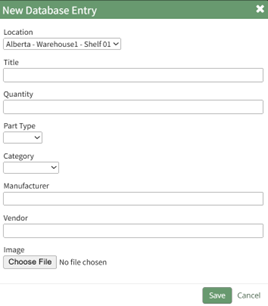
The Stock Database is created for general or stock inventory items that do not have a unique identifier. The fields included in the Stock Database will show on the modal for each stock item in the inventory. All inventories are required to integrate with a stock database.

[![image.png](https://kaswiki.kastrack.com/uploads/images/gallery/2026-01/scaled-1680-/Vulimage.png)](https://kaswiki.kastrack.com/uploads/images/gallery/2026-01/Vulimage.png)

Your stock database can include a variety of fields, but for the Inventory Module to function properly there are required fields.

<table id="bkmrk-stock-database-requi"><colgroup><col style="width: 147px;"></col><col style="width: 591px;"></col></colgroup><tbody><tr><td colspan="2">**Stock Database Requirements**

</td></tr><tr><td>**Required Fields\***

</td><td>**Explanation**

</td></tr><tr><td>Location

</td><td>Inventory location can be defined through a single database, or multiple databases if desired.

</td></tr><tr><td>Inventory Item Title

</td><td>This field will be used to identify the stock inventory item. Some examples of possible field names include title, item, part, etc. The Title will be comprised out of fields in the stock database.

</td></tr><tr><td>Quantity

</td><td>This field will state the number of stock items currently in the inventory.

</td></tr><tr><td>Part Type

</td><td>A inventory item must be specified as generic or unique if the inventory is integrated with a unique items database.

<p class="callout info">Part Type is only a required field if you have both a stock and a unique database.</p>

</td></tr><tr><td colspan="2"><p class="callout danger">\* The actual field name for required fields can be customized to your preference.</p>

</td></tr></tbody></table>

<details id="bkmrk-how-to%3A-create-a-sto"><summary>How To: Create a Stock Database</summary>

{{@459}}

</details>#### Unique Items Database

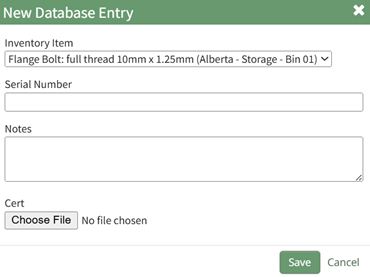
The unique items database is generated if you have inventory items that have a unique identifier, such a serial number. The fields included in the Unique Items Database will show on the modal for each unique item in the inventory. Inventories are not required to have a unique items database to function properly.

[![image.png](https://kaswiki.kastrack.com/uploads/images/gallery/2026-01/scaled-1680-/0Hwimage.png)](https://kaswiki.kastrack.com/uploads/images/gallery/2026-01/0Hwimage.png)

Your unique items database can include a variety of fields, but for the Inventory Module to function properly, it must have field(s) that identify the inventory item (title) and field(s) that are used to identify the unique item.

<details id="bkmrk-how-to%3A-create-a-uni"><summary>How To: Create a Unique Items Database</summary>

{{@460}}

</details>

# Inventory: Module Pages

# Home Page

The Inventory Module Home Page is where all inventories in KAStrack are created, housed and managed. The Home Page of the Inventory Module displays the Inventory Table.

[![image.png](https://kaswiki.kastrack.com/uploads/images/gallery/2025-12/scaled-1680-/wGXimage.png)](https://kaswiki.kastrack.com/uploads/images/gallery/2025-12/wGXimage.png)

#### Inventory Table Context Menu Explanation

[![image.png](https://kaswiki.kastrack.com/uploads/images/gallery/2025-12/scaled-1680-/dEWimage.png)](https://kaswiki.kastrack.com/uploads/images/gallery/2025-12/dEWimage.png)

Selecting the triple dot (…) icon to the right of an inventory title in the Inventory Table will opens a context menu. The options and an explanation of each action are included in the table below.

<table id="bkmrk-inventory-table-cont-1"><colgroup><col style="width: 141px;"></col><col style="width: 301px;"></col><col style="width: 469px;"></col></colgroup><tbody><tr><td colspan="3">**Inventory Table Context Menu Explanation**

</td></tr><tr><td>**Option**

</td><td>**Action**

</td><td>**Image**

</td></tr><tr><td>View Full Inventory

</td><td>Selecting “View Full Inventory” from the context menu opens the inventory.

</td><td>[![image.png](https://kaswiki.kastrack.com/uploads/images/gallery/2025-12/scaled-1680-/GGMimage.png)](https://kaswiki.kastrack.com/uploads/images/gallery/2025-12/GGMimage.png)

</td></tr><tr><td>Inventory Properties

</td><td>Selecting “Inventory Properties” from the context menu opens the Inventory Properties Module.

<details><summary>How To: Edit an Inventory</summary>

{{@464}}

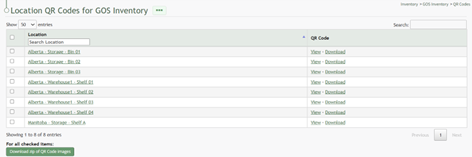
</details></td><td style="background-color: rgb(149, 165, 166);"></td></tr><tr><td>Location QR Codes

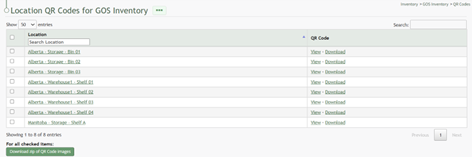
</td><td>Selecting “Location QR Codes” from the context menu opens the Location QR Codes for (INVENTORY NAME) Page.

</td><td>[![image.png](https://kaswiki.kastrack.com/uploads/images/gallery/2025-12/scaled-1680-/B4oimage.png)](https://kaswiki.kastrack.com/uploads/images/gallery/2025-12/B4oimage.png)

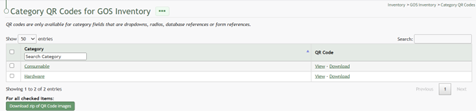
</td></tr><tr><td>Category QR Codes

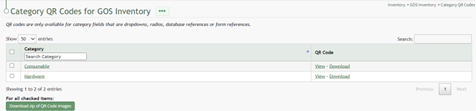
</td><td>Selecting “Category QR Codes” from the context menu opens the Category QR Codes for (INVENTORY NAME) Page.

</td><td>[![image.png](https://kaswiki.kastrack.com/uploads/images/gallery/2025-12/scaled-1680-/Mviimage.png)](https://kaswiki.kastrack.com/uploads/images/gallery/2025-12/Mviimage.png)

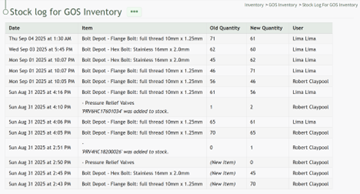
</td></tr><tr><td>Stock Log

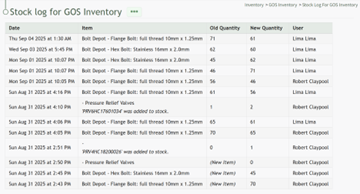
</td><td>Selecting “Stock Log” from the context menu opens the Stock Log for (INVENTORY NAME) Page. The stock log tracks all quantity changes in an inventory.

</td><td>[![image.png](https://kaswiki.kastrack.com/uploads/images/gallery/2025-12/scaled-1680-/J1timage.png)](https://kaswiki.kastrack.com/uploads/images/gallery/2025-12/J1timage.png)

</td></tr><tr><td>Delete Inventory

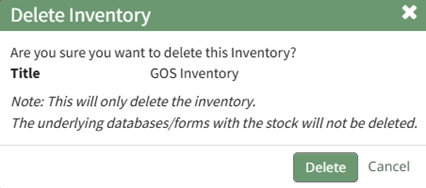
</td><td>Selecting “Delete Inventory” from the context menu opens the Delete Inventory Confirmation Modal.

<details><summary>How To: Delete an Inventory</summary>

{{@463}}

</details></td><td>[![image.png](https://kaswiki.kastrack.com/uploads/images/gallery/2025-12/scaled-1680-/952image.png)](https://kaswiki.kastrack.com/uploads/images/gallery/2025-12/952image.png)

</td></tr></tbody></table>

# Settings Page

The Module Levels Tab of Settings Page can be accessed from the Main Menu. The system default module levels for the module are visible in the Module Levels Table. New module levels with customizable permissions can be created and managed on this tab.

[![image.png](https://kaswiki.kastrack.com/uploads/images/gallery/2026-06/scaled-1680-/iByimage.png)](https://kaswiki.kastrack.com/uploads/images/gallery/2026-06/iByimage.png)

<span style="color: rgb(68, 68, 68); background-color: rgb(255, 255, 255); white-space: pre-wrap;">There are four system default module levels associated with the Inventory Module. An explanation of the permissions associated with each default module level are shown in the Inventory Module Level Permissions Table below. </span>

<p class="callout info">System default module levels cannot be customized.</p>

<table id="bkmrk-inventory-module-lev" style="box-sizing: border-box; outline-color: rgb(32, 110, 167); outline-width: 1px; margin: 0.3em 0px 1.375em; padding: 0px; border: 0px; font-style: normal; font-variant-ligatures: normal; font-variant-caps: normal; font-variant-numeric: inherit; font-variant-east-asian: inherit; font-variant-alternates: inherit; font-variant-position: inherit; font-variant-emoji: inherit; font-weight: 400; font-stretch: inherit; font-size: 14px; line-height: inherit; font-family: -apple-system, BlinkMacSystemFont, "Segoe UI", Oxygen, Ubuntu, Roboto, Cantarell, "Fira Sans", "Droid Sans", "Helvetica Neue", sans-serif; font-optical-sizing: inherit; font-size-adjust: inherit; font-kerning: inherit; font-feature-settings: inherit; font-variation-settings: inherit; font-language-override: inherit; vertical-align: baseline; border-collapse: collapse; border-spacing: 0px; min-width: 100px; max-width: 100%; hyphens: auto; table-layout: fixed; color: rgb(68, 68, 68); letter-spacing: normal; orphans: 2; text-align: start; text-transform: none; widows: 2; word-spacing: 0px; -webkit-text-stroke-width: 0px; white-space: normal; background-color: rgb(255, 255, 255); text-decoration-thickness: initial; text-decoration-style: initial; text-decoration-color: initial;"><colgroup><col style="width: 112px;"></col><col style="width: 722px;"></col></colgroup><tbody><tr style="box-sizing: border-box; outline-color: rgb(32, 110, 167); outline-width: 1px; margin: 0px; padding: 0px; border: 0px; font: inherit; vertical-align: baseline;"><td colspan="2" style="box-sizing: border-box; outline-color: rgb(32, 110, 167); outline-width: 1px; margin: 0px; padding: 6px 8px; border: 1px solid rgb(221, 221, 221); font-style: inherit; font-variant: inherit; font-weight: inherit; font-stretch: inherit; font-size: inherit; line-height: 1.2; font-family: inherit; font-optical-sizing: inherit; font-size-adjust: inherit; font-kerning: inherit; font-feature-settings: inherit; font-variation-settings: inherit; font-language-override: inherit; vertical-align: top; min-width: 10px; overflow: auto; word-break: break-word;">**Inventory Module Level Permissions Table**

</td></tr><tr style="box-sizing: border-box; outline-color: rgb(32, 110, 167); outline-width: 1px; margin: 0px; padding: 0px; border: 0px; font: inherit; vertical-align: baseline;"><td style="box-sizing: border-box; outline-color: rgb(32, 110, 167); outline-width: 1px; margin: 0px; padding: 6px 8px; border: 1px solid rgb(221, 221, 221); font-style: inherit; font-variant: inherit; font-weight: inherit; font-stretch: inherit; font-size: inherit; line-height: 1.2; font-family: inherit; font-optical-sizing: inherit; font-size-adjust: inherit; font-kerning: inherit; font-feature-settings: inherit; font-variation-settings: inherit; font-language-override: inherit; vertical-align: top; min-width: 10px; overflow: auto; word-break: break-word;">**Module Level**

</td><td style="box-sizing: border-box; outline-color: rgb(32, 110, 167); outline-width: 1px; margin: 0px; padding: 6px 8px; border: 1px solid rgb(221, 221, 221); font-style: inherit; font-variant: inherit; font-weight: inherit; font-stretch: inherit; font-size: inherit; line-height: 1.2; font-family: inherit; font-optical-sizing: inherit; font-size-adjust: inherit; font-kerning: inherit; font-feature-settings: inherit; font-variation-settings: inherit; font-language-override: inherit; vertical-align: top; min-width: 10px; overflow: auto; word-break: break-word;">**Permissions**

</td></tr><tr style="box-sizing: border-box; outline-color: rgb(32, 110, 167); outline-width: 1px; margin: 0px; padding: 0px; border: 0px; font: inherit; vertical-align: baseline;"><td style="box-sizing: border-box; outline-color: rgb(32, 110, 167); outline-width: 1px; margin: 0px; padding: 6px 8px; border: 1px solid rgb(221, 221, 221); font-style: inherit; font-variant: inherit; font-weight: inherit; font-stretch: inherit; font-size: inherit; line-height: 1.2; font-family: inherit; font-optical-sizing: inherit; font-size-adjust: inherit; font-kerning: inherit; font-feature-settings: inherit; font-variation-settings: inherit; font-language-override: inherit; vertical-align: top; min-width: 10px; overflow: auto; word-break: break-word;">Admin

</td><td style="box-sizing: border-box; outline-color: rgb(32, 110, 167); outline-width: 1px; margin: 0px; padding: 6px 8px; border: 1px solid rgb(221, 221, 221); font-style: inherit; font-variant: inherit; font-weight: inherit; font-stretch: inherit; font-size: inherit; line-height: 1.2; font-family: inherit; font-optical-sizing: inherit; font-size-adjust: inherit; font-kerning: inherit; font-feature-settings: inherit; font-variation-settings: inherit; font-language-override: inherit; vertical-align: top; min-width: 10px; overflow: auto; word-break: break-word;">Manage inventories (Create, view, edit, delete inventory), Manage inventory databases, view stock log, manage roles, manage permissions, Manage stock (Can adjust)

</td></tr><tr style="box-sizing: border-box; outline-color: rgb(32, 110, 167); outline-width: 1px; margin: 0px; padding: 0px; border: 0px; font: inherit; vertical-align: baseline;"><td style="box-sizing: border-box; outline-color: rgb(32, 110, 167); outline-width: 1px; margin: 0px; padding: 6px 8px; border: 1px solid rgb(221, 221, 221); font-style: inherit; font-variant: inherit; font-weight: inherit; font-stretch: inherit; font-size: inherit; line-height: 1.2; font-family: inherit; font-optical-sizing: inherit; font-size-adjust: inherit; font-kerning: inherit; font-feature-settings: inherit; font-variation-settings: inherit; font-language-override: inherit; vertical-align: top; min-width: 10px; overflow: auto; word-break: break-word;">Guest

</td><td style="box-sizing: border-box; outline-color: rgb(32, 110, 167); outline-width: 1px; margin: 0px; padding: 6px 8px; border: 1px solid rgb(221, 221, 221); font-style: inherit; font-variant: inherit; font-weight: inherit; font-stretch: inherit; font-size: inherit; line-height: 1.2; font-family: inherit; font-optical-sizing: inherit; font-size-adjust: inherit; font-kerning: inherit; font-feature-settings: inherit; font-variation-settings: inherit; font-language-override: inherit; vertical-align: top; min-width: 10px; overflow: auto; word-break: break-word;">N/A

</td></tr><tr style="box-sizing: border-box; outline-color: rgb(32, 110, 167); outline-width: 1px; margin: 0px; padding: 0px; border: 0px; font: inherit; vertical-align: baseline;"><td style="box-sizing: border-box; outline-color: rgb(32, 110, 167); outline-width: 1px; margin: 0px; padding: 6px 8px; border: 1px solid rgb(221, 221, 221); font-style: inherit; font-variant: inherit; font-weight: inherit; font-stretch: inherit; font-size: inherit; line-height: 1.2; font-family: inherit; font-optical-sizing: inherit; font-size-adjust: inherit; font-kerning: inherit; font-feature-settings: inherit; font-variation-settings: inherit; font-language-override: inherit; vertical-align: top; min-width: 10px; overflow: auto; word-break: break-word;">Manager

</td><td style="box-sizing: border-box; outline-color: rgb(32, 110, 167); outline-width: 1px; margin: 0px; padding: 6px 8px; border: 1px solid rgb(221, 221, 221); font-style: inherit; font-variant: inherit; font-weight: inherit; font-stretch: inherit; font-size: inherit; line-height: 1.2; font-family: inherit; font-optical-sizing: inherit; font-size-adjust: inherit; font-kerning: inherit; font-feature-settings: inherit; font-variation-settings: inherit; font-language-override: inherit; vertical-align: top; min-width: 10px; overflow: auto; word-break: break-word;">Manage inventories (Create, view, edit, delete inventory), Manage inventory databases, view stock log

</td></tr><tr style="box-sizing: border-box; outline-color: rgb(32, 110, 167); outline-width: 1px; margin: 0px; padding: 0px; border: 0px; font: inherit; vertical-align: baseline;"><td style="box-sizing: border-box; outline-color: rgb(32, 110, 167); outline-width: 1px; margin: 0px; padding: 6px 8px; border: 1px solid rgb(221, 221, 221); font-style: inherit; font-variant: inherit; font-weight: inherit; font-stretch: inherit; font-size: inherit; line-height: 1.2; font-family: inherit; font-optical-sizing: inherit; font-size-adjust: inherit; font-kerning: inherit; font-feature-settings: inherit; font-variation-settings: inherit; font-language-override: inherit; vertical-align: top; min-width: 10px; overflow: auto; word-break: break-word;">Staff

</td><td style="box-sizing: border-box; outline-color: rgb(32, 110, 167); outline-width: 1px; margin: 0px; padding: 6px 8px; border: 1px solid rgb(221, 221, 221); font-style: inherit; font-variant: inherit; font-weight: inherit; font-stretch: inherit; font-size: inherit; line-height: 1.2; font-family: inherit; font-optical-sizing: inherit; font-size-adjust: inherit; font-kerning: inherit; font-feature-settings: inherit; font-variation-settings: inherit; font-language-override: inherit; vertical-align: top; min-width: 10px; overflow: auto; word-break: break-word;">Manage inventories (view inventory, view stock log), can adjust manage stock

</td></tr></tbody></table>

New Module Levels can be created in order to customize module level permissions to suit your organization's needs. An explanation of the icons associated with customized module levels have been provided in the table below.

<table id="bkmrk-module-level-customi" style="box-sizing: border-box; outline-color: rgb(32, 110, 167); outline-width: 1px; margin: 0.3em 0px 1.375em; padding: 0px; border: 0px; font-style: normal; font-variant-ligatures: normal; font-variant-caps: normal; font-variant-numeric: inherit; font-variant-east-asian: inherit; font-variant-alternates: inherit; font-variant-position: inherit; font-variant-emoji: inherit; font-weight: 400; font-stretch: inherit; font-size: 14px; line-height: inherit; font-family: -apple-system, BlinkMacSystemFont, "Segoe UI", Oxygen, Ubuntu, Roboto, Cantarell, "Fira Sans", "Droid Sans", "Helvetica Neue", sans-serif; font-optical-sizing: inherit; font-size-adjust: inherit; font-kerning: inherit; font-feature-settings: inherit; font-variation-settings: inherit; font-language-override: inherit; vertical-align: baseline; border-collapse: collapse; border-spacing: 0px; min-width: 100px; max-width: 100%; hyphens: auto; table-layout: fixed; color: rgb(68, 68, 68); letter-spacing: normal; orphans: 2; text-align: start; text-transform: none; widows: 2; word-spacing: 0px; -webkit-text-stroke-width: 0px; white-space: normal; text-decoration-thickness: initial; text-decoration-style: initial; text-decoration-color: initial; background-color: rgb(255, 255, 255);"><colgroup><col style="width: 82px;"></col><col style="width: 783px;"></col></colgroup><tbody><tr style="box-sizing: border-box; outline-color: rgb(32, 110, 167); outline-width: 1px; margin: 0px; padding: 0px; border: 0px; font: inherit; vertical-align: baseline;"><td colspan="2" style="box-sizing: border-box; outline-color: rgb(32, 110, 167); outline-width: 1px; margin: 0px; padding: 6px 8px; border: 1px solid rgb(221, 221, 221); font-style: inherit; font-variant: inherit; font-weight: inherit; font-stretch: inherit; font-size: inherit; line-height: 1.2; font-family: inherit; font-optical-sizing: inherit; font-size-adjust: inherit; font-kerning: inherit; font-feature-settings: inherit; font-variation-settings: inherit; font-language-override: inherit; vertical-align: top; min-width: 10px; overflow: auto; word-break: break-word;">**Module Level Customization Icons**

</td></tr><tr style="box-sizing: border-box; outline-color: rgb(32, 110, 167); outline-width: 1px; margin: 0px; padding: 0px; border: 0px; font: inherit; vertical-align: baseline;"><td style="box-sizing: border-box; outline-color: rgb(32, 110, 167); outline-width: 1px; margin: 0px; padding: 6px 8px; border: 1px solid rgb(221, 221, 221); font-style: inherit; font-variant: inherit; font-weight: inherit; font-stretch: inherit; font-size: inherit; line-height: 1.2; font-family: inherit; font-optical-sizing: inherit; font-size-adjust: inherit; font-kerning: inherit; font-feature-settings: inherit; font-variation-settings: inherit; font-language-override: inherit; vertical-align: top; min-width: 10px; overflow: auto; word-break: break-word;">**Icon**

</td><td style="box-sizing: border-box; outline-color: rgb(32, 110, 167); outline-width: 1px; margin: 0px; padding: 6px 8px; border: 1px solid rgb(221, 221, 221); font-style: inherit; font-variant: inherit; font-weight: inherit; font-stretch: inherit; font-size: inherit; line-height: 1.2; font-family: inherit; font-optical-sizing: inherit; font-size-adjust: inherit; font-kerning: inherit; font-feature-settings: inherit; font-variation-settings: inherit; font-language-override: inherit; vertical-align: top; min-width: 10px; overflow: auto; word-break: break-word;">**Explanation**

</td></tr><tr style="box-sizing: border-box; outline-color: rgb(32, 110, 167); outline-width: 1px; margin: 0px; padding: 0px; border: 0px; font: inherit; vertical-align: baseline;"><td style="box-sizing: border-box; outline-color: rgb(32, 110, 167); outline-width: 1px; margin: 0px; padding: 6px 8px; border: 1px solid rgb(221, 221, 221); font-style: inherit; font-variant: inherit; font-weight: inherit; font-stretch: inherit; font-size: inherit; line-height: 1.2; font-family: inherit; font-optical-sizing: inherit; font-size-adjust: inherit; font-kerning: inherit; font-feature-settings: inherit; font-variation-settings: inherit; font-language-override: inherit; vertical-align: top; min-width: 10px; overflow: auto; word-break: break-word;">[![image.png](https://kaswiki.kastrack.com/uploads/images/gallery/2025-12/scaled-1680-/OQrimage.png)](https://kaswiki.kastrack.com/uploads/images/gallery/2025-12/OQrimage.png)

</td><td style="box-sizing: border-box; outline-color: rgb(32, 110, 167); outline-width: 1px; margin: 0px; padding: 6px 8px; border: 1px solid rgb(221, 221, 221); font-style: inherit; font-variant: inherit; font-weight: inherit; font-stretch: inherit; font-size: inherit; line-height: 1.2; font-family: inherit; font-optical-sizing: inherit; font-size-adjust: inherit; font-kerning: inherit; font-feature-settings: inherit; font-variation-settings: inherit; font-language-override: inherit; vertical-align: top; min-width: 10px; overflow: auto; word-break: break-word;">The eyeball icon allows you to view users assigned to the module level as well as the permissions assigned to them.

</td></tr><tr style="box-sizing: border-box; outline-color: rgb(32, 110, 167); outline-width: 1px; margin: 0px; padding: 0px; border: 0px; font: inherit; vertical-align: baseline;"><td style="box-sizing: border-box; outline-color: rgb(32, 110, 167); outline-width: 1px; margin: 0px; padding: 6px 8px; border: 1px solid rgb(221, 221, 221); font-style: inherit; font-variant: inherit; font-weight: inherit; font-stretch: inherit; font-size: inherit; line-height: 1.2; font-family: inherit; font-optical-sizing: inherit; font-size-adjust: inherit; font-kerning: inherit; font-feature-settings: inherit; font-variation-settings: inherit; font-language-override: inherit; vertical-align: top; min-width: 10px; overflow: auto; word-break: break-word;">[![image.png](https://kaswiki.kastrack.com/uploads/images/gallery/2025-12/scaled-1680-/Bbrimage.png)](https://kaswiki.kastrack.com/uploads/images/gallery/2025-12/Bbrimage.png)

</td><td style="box-sizing: border-box; outline-color: rgb(32, 110, 167); outline-width: 1px; margin: 0px; padding: 6px 8px; border: 1px solid rgb(221, 221, 221); font-style: inherit; font-variant: inherit; font-weight: inherit; font-stretch: inherit; font-size: inherit; line-height: 1.2; font-family: inherit; font-optical-sizing: inherit; font-size-adjust: inherit; font-kerning: inherit; font-feature-settings: inherit; font-variation-settings: inherit; font-language-override: inherit; vertical-align: top; min-width: 10px; overflow: auto; word-break: break-word;">The bulleted list icon allows you to assign permissions to customized module levels.

</td></tr><tr style="box-sizing: border-box; outline-color: rgb(32, 110, 167); outline-width: 1px; margin: 0px; padding: 0px; border: 0px; font: inherit; vertical-align: baseline;"><td style="box-sizing: border-box; outline-color: rgb(32, 110, 167); outline-width: 1px; margin: 0px; padding: 6px 8px; border: 1px solid rgb(221, 221, 221); font-style: inherit; font-variant: inherit; font-weight: inherit; font-stretch: inherit; font-size: inherit; line-height: 1.2; font-family: inherit; font-optical-sizing: inherit; font-size-adjust: inherit; font-kerning: inherit; font-feature-settings: inherit; font-variation-settings: inherit; font-language-override: inherit; vertical-align: top; min-width: 10px; overflow: auto; word-break: break-word;">[![image.png](https://kaswiki.kastrack.com/uploads/images/gallery/2025-12/scaled-1680-/ELJimage.png)](https://kaswiki.kastrack.com/uploads/images/gallery/2025-12/ELJimage.png)

</td><td style="box-sizing: border-box; outline-color: rgb(32, 110, 167); outline-width: 1px; margin: 0px; padding: 6px 8px; border: 1px solid rgb(221, 221, 221); font-style: inherit; font-variant: inherit; font-weight: inherit; font-stretch: inherit; font-size: inherit; line-height: 1.2; font-family: inherit; font-optical-sizing: inherit; font-size-adjust: inherit; font-kerning: inherit; font-feature-settings: inherit; font-variation-settings: inherit; font-language-override: inherit; vertical-align: top; min-width: 10px; overflow: auto; word-break: break-word;">The pencil icon opens the Edit Module Level Modal.

</td></tr><tr style="box-sizing: border-box; outline-color: rgb(32, 110, 167); outline-width: 1px; margin: 0px; padding: 0px; border: 0px; font: inherit; vertical-align: baseline;"><td style="box-sizing: border-box; outline-color: rgb(32, 110, 167); outline-width: 1px; margin: 0px; padding: 6px 8px; border: 1px solid rgb(221, 221, 221); font-style: inherit; font-variant: inherit; font-weight: inherit; font-stretch: inherit; font-size: inherit; line-height: 1.2; font-family: inherit; font-optical-sizing: inherit; font-size-adjust: inherit; font-kerning: inherit; font-feature-settings: inherit; font-variation-settings: inherit; font-language-override: inherit; vertical-align: top; min-width: 10px; overflow: auto; word-break: break-word;">[![image.png](https://kaswiki.kastrack.com/uploads/images/gallery/2025-12/scaled-1680-/Uwlimage.png)](https://kaswiki.kastrack.com/uploads/images/gallery/2025-12/Uwlimage.png)

</td><td style="box-sizing: border-box; outline-color: rgb(32, 110, 167); outline-width: 1px; margin: 0px; padding: 6px 8px; border: 1px solid rgb(221, 221, 221); font-style: inherit; font-variant: inherit; font-weight: inherit; font-stretch: inherit; font-size: inherit; line-height: 1.2; font-family: inherit; font-optical-sizing: inherit; font-size-adjust: inherit; font-kerning: inherit; font-feature-settings: inherit; font-variation-settings: inherit; font-language-override: inherit; vertical-align: top; min-width: 10px; overflow: auto; word-break: break-word;">The trashcan icon opens the Delete Module Level Confirmation Modal.

</td></tr></tbody></table>

<details id="bkmrk-how-to%3A-create-modul"><summary>How To: Create Module Levels (Inventory Module)</summary>

{{@462}}

</details>A complete list of all permissions associated with the Inventory Module have been provided below.

[![image.png](https://kaswiki.kastrack.com/uploads/images/gallery/2026-06/scaled-1680-/9Qbimage.png)](https://kaswiki.kastrack.com/uploads/images/gallery/2026-06/9Qbimage.png)

# An Inventory

When an inventory has been opened, the three dot (…) icon located to the right of the inventory name header opens the inventory context menu explained in the table below.

[![image.png](https://kaswiki.kastrack.com/uploads/images/gallery/2026-01/scaled-1680-/ycaimage.png)](https://kaswiki.kastrack.com/uploads/images/gallery/2026-01/ycaimage.png)

<table id="bkmrk-an-inventory%27s-conte"><colgroup><col style="width: 240px;"></col><col style="width: 240px;"></col><col style="width: 399px;"></col></colgroup><tbody><tr style="height: 10px;"><td colspan="3">**An Inventory's Context Menu Explanation**

</td></tr><tr><td>**Option**

</td><td>**Associated Action**

</td><td>**Image / Explanation**

</td></tr><tr><td>Inventory Properties

</td><td>Selecting “Inventory Properties” from the context menu opens the Inventory Properties Module.

</td><td style="background-color: rgb(149, 165, 166);"></td></tr><tr><td>Location QR Codes

</td><td>Selecting “Location QR Codes” from the context menu opens the Location QR Codes for (INVENTORY NAME) Page.

</td><td>[![image.png](https://kaswiki.kastrack.com/uploads/images/gallery/2026-01/scaled-1680-/MGEimage.png)](https://kaswiki.kastrack.com/uploads/images/gallery/2026-01/MGEimage.png)

</td></tr><tr><td>Category QR Codes

</td><td>Selecting “Category QR Codes” from the context menu opens the Category QR Codes for (INVENTORY NAME) Page.

</td><td>[![image.png](https://kaswiki.kastrack.com/uploads/images/gallery/2026-01/scaled-1680-/zE5image.png)](https://kaswiki.kastrack.com/uploads/images/gallery/2026-01/zE5image.png)

</td></tr><tr style="height: 10px;"><td>Stock Log

</td><td>Selecting “Stock Log” from the context menu opens the Stock Log for (INVENTORY NAME) Page. The stock log tracks all quantity changes in an inventory.

</td><td>[![image.png](https://kaswiki.kastrack.com/uploads/images/gallery/2026-01/scaled-1680-/Cvqimage.png)](https://kaswiki.kastrack.com/uploads/images/gallery/2026-01/Cvqimage.png)

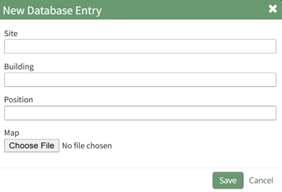
</td></tr><tr><td>Add Location Inventory (Inventory Locations)

</td><td>Selecting “Add Location (Inventory Locations)” from the context menu opens the New Database Entry Modal.

</td><td>[![image.png](https://kaswiki.kastrack.com/uploads/images/gallery/2026-01/scaled-1680-/jqWimage.png)](https://kaswiki.kastrack.com/uploads/images/gallery/2026-01/jqWimage.png)

</td></tr><tr><td>Add Stock Item

</td><td>Selecting “Add Stock Item” from the context menu opens the New Database Entry Modal.

</td><td>[![image.png](https://kaswiki.kastrack.com/uploads/images/gallery/2026-01/scaled-1680-/i8Eimage.png)](https://kaswiki.kastrack.com/uploads/images/gallery/2026-01/i8Eimage.png)

</td></tr><tr><td>Add Unique Item

</td><td>Selecting “Add Unique Item” from the context menu opens the New Database Entry Modal.

</td><td>[![image.png](https://kaswiki.kastrack.com/uploads/images/gallery/2026-01/scaled-1680-/bXDimage.png)](https://kaswiki.kastrack.com/uploads/images/gallery/2026-01/bXDimage.png)

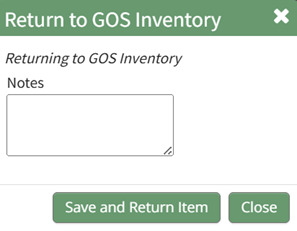
</td></tr><tr><td>Return Unique Item to Inventory

</td><td>Selecting “Return Unique Item to Inventory” from the context menu opens the Return to (INVENTORY NAME) Modal.

</td><td>[![image.png](https://kaswiki.kastrack.com/uploads/images/gallery/2026-01/scaled-1680-/rvjimage.png)](https://kaswiki.kastrack.com/uploads/images/gallery/2026-01/rvjimage.png)

</td></tr><tr><td>Go to Locations Database (Underlying Location Database Name)

</td><td>Selecting “Go to locations database (UnderlyingLocations DatabseName)” from the context menu opens the Entries for Database ‘Inventory Locations’ Page, found on the Home Page of the Database Module.

</td><td>Every inventory requires integration with a locations database.

</td></tr><tr><td>Go to Stock Database

</td><td>Selecting “Go to stock database” from the context menu opens the Entries for Database ‘Stock Inventory’ Page, found on the Home Page of the Database Module.

</td><td>A stock database is not required. If all items in an inventory are unique and there are no stock inventory items, this option will not show on the context menu.

The option appears on the context menu when a stock database has been integrated with the inventory.

</td></tr><tr><td>Go to Unique Items Database

</td><td>Selecting “Go to unique items database” from the context menu opens the Entries for Database ‘Serialized Inventory’, found on the Home Page of the Database Module.

</td><td>A unique items database is not required. If all items in an inventory are stock items and there are no unique inventory items, this option will not show on the context menu.

The option appears on the context menu when a stock database has been integrated with the inventory.

</td></tr></tbody></table>

# Inventory: Supplemental Resources

There are no email alerts associated with the Inventory Module.

# Complete List of Inventory Module How Tos

{{@454}}