# Courses: Introduction

# Courses Module Summary

The Courses Module is used to create and edit courses. The module’s customizable question formatting allows for both graded assessments (e.g., employee certification training) and ungraded knowledge checks.

<span style="white-space: pre-wrap;">The Courses Module is only available to users with course-management permissions (e.g. Instructors). Because visibility is restricted to the instructors with course-management permissions, users will not see this module. </span>

<p class="callout warning">In order for a user to access a course, the course must be set as a required activity in a certification after the course is created in the People Module. The certification must be assigned to the user.</p>

# Main Menu Page Summaries

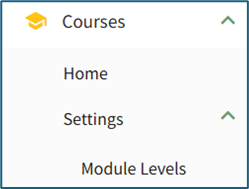
<span style="color: black;">The Courses Module on the Main Menu shows two pages, Home and Settings.</span>

[![image.png](https://kaswiki.kastrack.com/uploads/images/gallery/2025-12/scaled-1680-/O79image.png)](https://kaswiki.kastrack.com/uploads/images/gallery/2025-12/O79image.png)

<table id="bkmrk-courses-module---mai" style="border-style: solid; border-color: rgb(52, 73, 94);"><colgroup><col style="width: 71px;"></col><col style="width: 750px;"></col></colgroup><tbody><tr><td colspan="2">**Courses Module - Main Menu Page Summaries**

</td></tr><tr><td>**Page**

</td><td>**Summary Description**

</td></tr><tr><td>Home

</td><td><span style="color: black;">The Courses Module homepage is the Manage Courses Page. This is where new courses are created and existing courses are edited.</span>

</td></tr><tr><td>Settings

</td><td><span style="color: black;">“Settings” within the Courses Module directs the user to the Manage Module Levels Page where module level permissions for the Courses Module are customized.</span>

</td></tr></tbody></table>