Courses: Introduction
Courses Module Summary
The Courses Module is used to create and edit courses. The module’s customizable question formatting allows for both graded assessments (e.g., employee certification training) and ungraded knowledge checks.
The Courses Module is only available to users with course-management permissions (e.g. Instructors). Because visibility is restricted to the instructors with course-management permissions, users will not see this module.
In order for a user to access a course, the course must be set as a required activity in a certification after the course is created in the People Module. The certification must be assigned to the user.
The User Manual for the Courses Module is updated through Version 11.12.
Main Menu Page Summaries
The Courses Module on the Main Menu shows two pages, Home and Settings.
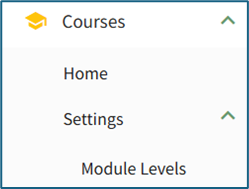
Courses Module - Main Menu Page Summaries | |
Page | Summary Description |
Home | The Courses Module homepage is the Manage Courses Page. This is where new courses are created and existing courses are edited. |
Settings | “Settings” within the Courses Module directs the user to the Manage Module Levels Page where module level permissions for the Courses Module are customized. |